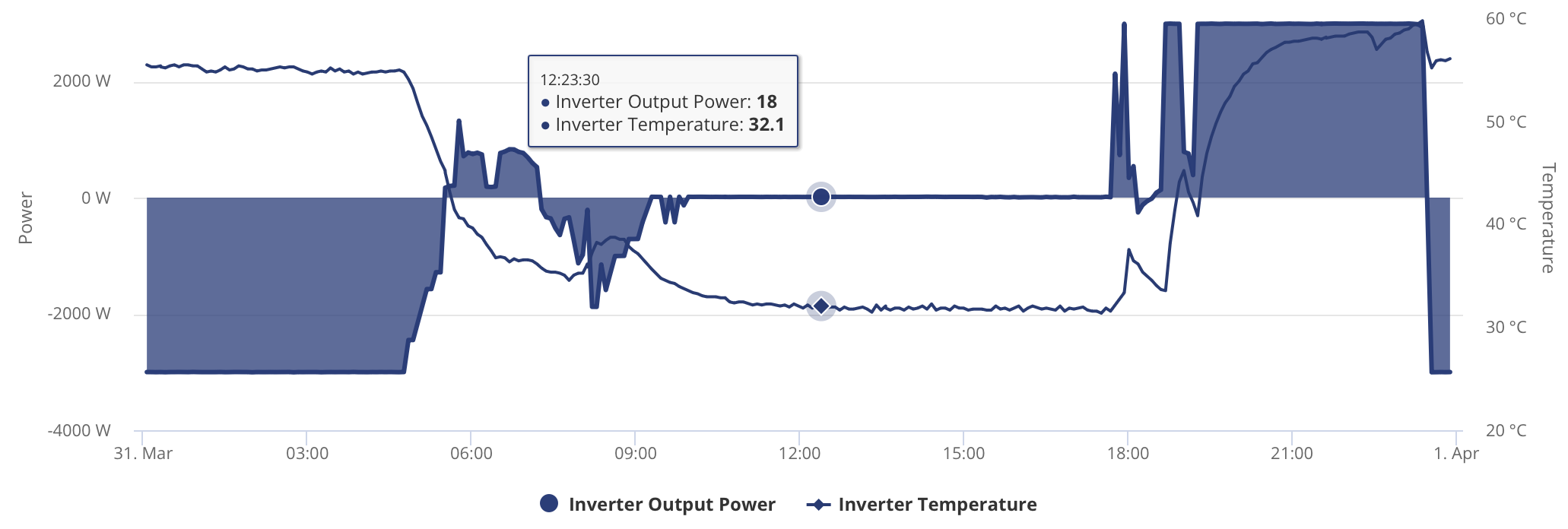
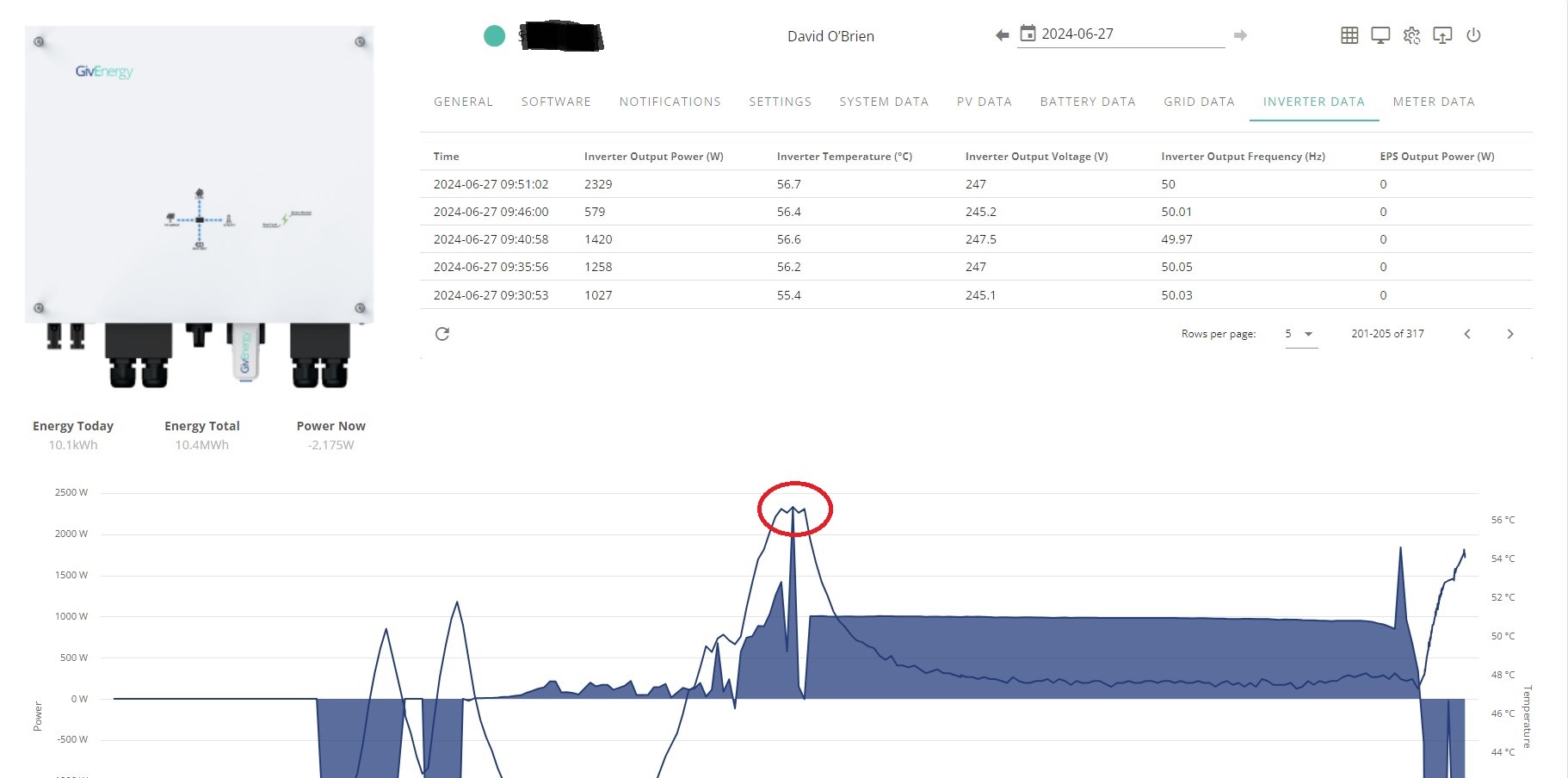
Today my battery reached a temperature of 33c and the inverter reached 56.7c at 10am this morning. The battery discharged fully between 10:00hrs and 18:00hrs only starting this evening. it is in a cupboard inside the house and i have had the system since 2022 without issue.
I suspect that the only thing that has changed is the additional activity created by being on Intelligent Flux Export means the system has little time to cool and the cumulative effect is the issue. Would this be a reasonable assumption ?
Your 100% right - it’s just getting HOT as it’s doing actual work - and if you have seen these temps since 2022 and your not having issues or concerns thats cool.
But for me I like to keep things cool - batteries like the warmth and inverters like the cool… - but if you put a few fans on it - how hot does it get then ?
I’ve got 3.6 gen2 inverter and 2x5.2 batteries. Last summer the inverter temp was regularly exceeding 55deg. It is installed in a loft on the south facing wall. This year I have installed 4x 92mm fans on the top of the inverter to pull air up through the cooling fins, and a blower below the inverter to provide forced air through the cooling fins. Ive connected these fans to a temperature switch where the sensor is located around 50mm below the top of the inverter, between cooling fins and with a small baffle below it so it doesn’t get triggered by the forced air flow. I’ve set the switch to cut in when the sensor records 32deg and switch off at 25deg. These temperatures don’t reflect internal inverter temp. I’ve just settled on them through trial and error. I have compared my internal inverter temp this year with the same dates last year and overall I am getting around a 10 deg reduction in internal inverter temp. I recognise that it is difficult to be very accurate with this analysis unless I have an identical un force cooled set up in the same location but I am confident that my action has delivered a positive result for the expenditure.
Had my AIO installed last week and added some graphs over the weekend to monitor in HA, saw inverter peak at ~70c this morning during over night charge, what mounting frames did you order for your fans please?
I just got a small piece of wood ( 3mm ) and made a Triangle, then custom fit it.
I just then used a HotGlue Gun to stick the wood to the wall, and I also used the glue to stick the fans together.
I am getting a 3D printer soon so might do something fancy - but I just put it on a Triangle so the fans blew into the side correctly.
My other hint is that I also bought some “Filter Foam” which once again are just glues to the back of the fans - this stops the dust from being pushed into the sides.
Now my final bit was that I put Duck Tape around the fan so no dust air gets pushed in ( I should have put a wood triangle on both the top and bottom really.
Thanks - I was trying to reply directly to @Josh to check what they had ordered from China mentioned in their comment, but either I don’t have sufficient rights a new member or didn’t do it right!
My plan was just to initially balance some 140mm USB fans on top of the AIO, but to then mount them properly on a frame - if I manage to teach myself how to use 3D design software I’ll share any useful STLs
If you don’t have Home Assistant of anything fancy to monitor the temp of your inverter… I have just added this to help cool a Raspberry Pi cluster I have.
When electronics is specified as -20/+50 deg C they are referring to the ambient temperature in which the equipment is rated to work. So the circuit board switching transistors (my guess, but these are doing the most work and therefore the most likely one would want to monitor) are operating at 51.4 deg C. Commercial semiconductors are often rated to 70 deg C and the physics of integrated circuits breakdown around 120 deg C. What this means is that assuming some decent heat management design you should have no worries about a 51 deg C measurement. As always if you can cool things down then there is no harm.
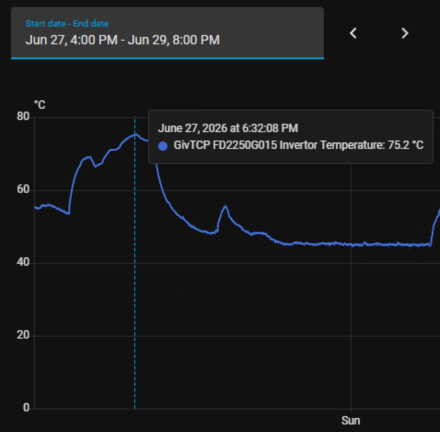
I spoke to GivEnergy support (via the app) for quite a while about this, after I noticed my inverter temps peaking at 65-79C almost every night, generally at the end of an export->import cycle. This has been going on for about a year (since my install) without me knowing about it.
For reference my setup is outside, so they get plenty of cool airflow (and no sun at night of course), but it’d be tricky to install & maintain fans.
The support agent checked my install location, checked logs on their end (over the course of a few days), and ultimately told me that these temps are fine. And to rest assured that it will temporarily shut off before getting to damaging temps, and that either way my warranty is in place should there be any impact on the unit due to temperature.
So I left it at that!
I did find that just adding a 5-10 minute break into import/export sessions makes a big difference though, so I’ve had that going for a while now and my peaks are generally more like 60.
I am using Home Assistant that kicks in these additional FANS at 60c - as these inverters are no longer under warranty I am just trying to keep it as cool as possible.
 - and if you have seen these temps since 2022 and your not having issues or concerns thats cool.