Givenergy app will not allow changes to a new ISP. It appears that my PV Hybrid Inverter 3-6-G3 has no dongle so no progress. There is the usual lack of support via the GE bot and looking at the various videos it does appear that a dongle is required for any progress.
G3 models have the dongle built in, should be on v206 as latest dongle software.
You should see a wifi SSid called something like WH1234X567 (where 1234X567 will be the same as your inverter last 8 chars) which you can connect to with a laptop of phone, and in there.
Once connected there ( and the connection may drop if you have no internet from it, so you’ll have to force it to stay), you can go yo 10.10.100.254 and they login and set your new household SSID and password in it.
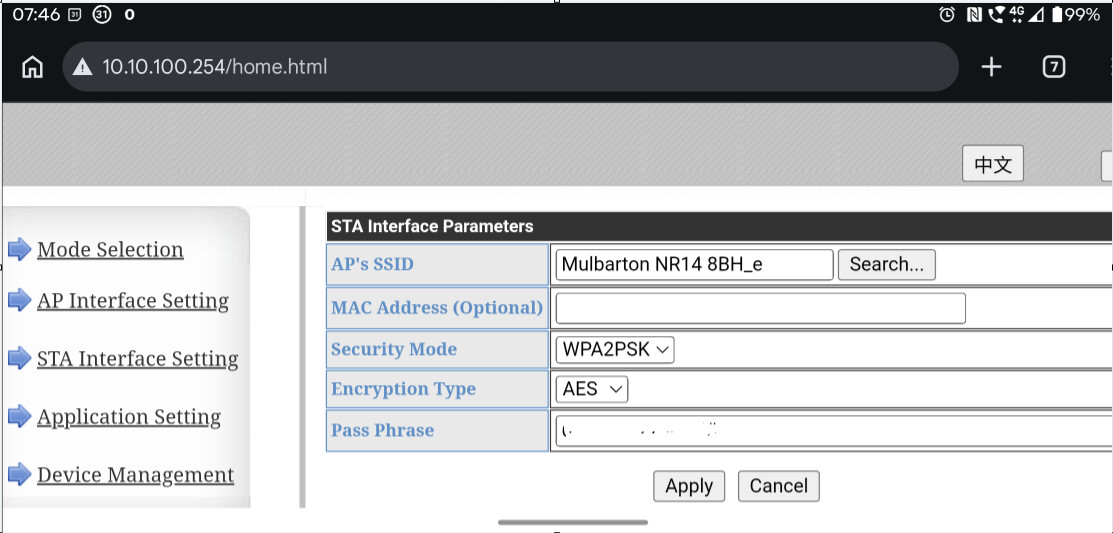
2 Likes
Morning,
If I need to replace my broadband router, I just configure the new router with the existing SSID and password, that way all devices just connect as before & I only need to change it in one place - would that be an option for you?
3 Likes
That only works if the new router will allow the same password as the old one.
I moved from a BT Home Hub 6 which I’d followed the password through several generation s of BT hubs from the original upright square white one with phone stand on the front.
When I switched to Yodafone last year I couldn’t reuse the old password as it wasn’t long enough, so had to finally redo my password on all devices…
get a WI-FI repeater and set it up like the old system inc password and wire it into the new router.
I had a problem when my system was first installed as the Givenergy system would not let me put my password (in Hex) into the system so I bought a cheap repeater and set it up with a short password. Then I allowed only my Inverters to connect to it.
1 Like
A suggestion for setting up a repeater can be found here