I have taken the plunge and installed HA and GivTCP this afternoon. Which is now doing my head in.
To start with the timed export option doesn’t seem to exist.
It didn’t do my usual export during peak rate. Or it might have been exporting a few watts as it seems the battery is not powering the house. On the normal GE portal, it says AIO status is “normal” but the Gateway it is “on grid”. I have never had the Gateway showing “on grid” in the entire time I have owned this system as far as I know, It’s often shown as “lost” or “waiting” but not seen “on grid” before. Once the sun went down I have been drawing from the grid according to the smart meter monitor. The light on the Gateway is just flashing green. The light on the AIO is flashing green. Tried turning the AIO off and on again at the switch button on the side.
I assume the normal portal (cloud) is now not doing anything as I have got HA and GivTCP. Trying to figure how I control settings on GivTCP is going to take some working out but I assume I have something set wrong to cause the battery to apparently “stop working”. I am loath to touch anything inside the Gateway as installer said “never touch that”. Any ideas pls?
I have an AC3 and givtcp running in docker, so not the same, but I dont think the mode should change due to your installing givtcp on HA.
Anyway, you can still use other methods in parallel to change the battery settings, schedules etc, such as the portal or mobile app, so don’t be afraid to change the mode using a different method.
Though whatever changed it might do so again of course, so you’ll want to get to the bottom of it. Givtcp alone should not change any settings unless something sends it a command to do so. Did you perhaps install predbat too?
Thanks for your reply. I log on to the portal cloud on a Windows laptop. Apparently, you can’t get local access on Windows. And no intention of changing that so it’s either pay the £5 a month, which would be fine if there was any guarantee the cloud would work when they go under too, but not a risk I want to take so trying to get local access anyway. I don’t own a mobile or Ipad etc. Hence buying the HA Green. Portal is the same this morning, well the same after two hours kip on the sofa as I was all night trying to sort it. Gateway still says “on grid” which I swear I have never seen before though husband says it’s been like that for ages, he rarely looks at the portal. To try to resolve that I attempted to uninstall HA Green, which seems impossible. It isn’t in programs or apps on my laptop. As that won’t work, I thought uninstall GivTCP. Which I thought I had done but after reinstalling it everything was back how I set it up to start with. So tried deleting each set up bit of GivTCP, if that makes sense. Now when I try to open anything I just get for example Battery Actual Capacity (I renamed whatever it was to start with)
Battery Actual Capacity KWh
This entity is no longer being provided by the mqtt integration. If the entity is no longer in use, delete it in settings. (that is in red).
Battery Actual Capacity KWh
1 hour ago
Unavailable
If I try to delete it comes up warning you won’t be able to get it back again. But they aren’t allowing me to update them anyway.
Activity
20 May 2026
Modbus Version became unavailable
02:59:19 - 7 hours ago
Meter Type became unavailable
02:59:19 - 7 hours ago
Invertor Type became unavailable
02:59:19 - 7 hours ago
Invertor Time became unavailable
02:59:19 - 7 hours ago
Invertor Serial Number became unavailable
02:59:19 - 7 hours ago
Invertor Firmware became unavailable
02:59:19 -
and so on.
I don’t know how to explain what is going on with it. haven’t downloaded Predbat. Is that something for a phone?
I installed HA Green, added the MZTT thing (Mosquito?), added GivTCP and I think that has done something to the portal, or more likely I have mucked it up!
If I could totally uninstall HA Green, it might help. I left that switched off for two hours whilst I napped, but that didn’t solve it. Unplugging it altogether from the broadband hub/router didn’t work. The router is hardwired to the AIO/gateway via TP Links each end plugged into the wall socket and router etc. All this tech is beyond me.
Or MQTT thing rather!
GivEnergy have not started charging for using the Cloud Portal yet. You can still use it to check and change settings on your system for nothing. It may be worth checking the log in the Remote Control section to see what has happened to your system.
Thanks. Trouble is the AIO and the Gateway have a flashing green light, battery is at 100% but is not powering the house, export times are not working and as it’s not going under 99/100% it doesn’t need to charge from the grid at cheap rate during that timed set up. Meanwhile I am importing at not cheap rate to power the house when solar isn’t sufficient. There is nothing obvious on the logs to indicate why the battery is not powering the house and now constantly staying at 99/100%.
At some stage I will have to run the system locally. As it seems very likely the premium option and cloud will go the same way as GE Ltd. “To fail to prepare is to prepare to fail”.
I’ve spent all day trying to set up HA and GivTCP again from scratch. I can’t see any setting on GivTCP that says “export”. Am I correct in assuming the discharge times/function on GivTCP are identical to export times/function on the portal? Only on the portal there are export AND discharge timed settings.
I have added to a dashboard:
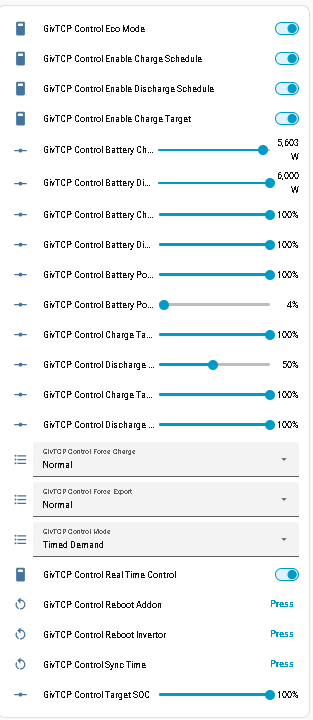
The Control Enable Discharge Schedule keeps toggling from on to off and the Control Mode near the bottom keeps going from Eco to Timed Demand. Whether those two settings are connected I don’t know. I moved those settings from GivTCP Control copying and pasting the URLs as per STTG’s video and the same with the timed settings from Timeslots to the same dashboard. I have tried cancelling export times on the portal and adding the same discharge settings to the portal as on GivTCP. I had the export times on the portal set the same as the discharge times on the GivTCP. Or in fact the times on the GivTCP for charging and “discharge” when I set it all up on HA were the same as the charging and “export” times that were already set on the portal (which seems to indicate export on portal is the same as discharge on GivTCP) but then surely the Enable Discharge Schedule should have to stay on and not keep toggling itself off when the other thing is set to eco?
I had obviously managed to delete/remove the previous HA and GivTCP that I had set up two days ago and have gone from scratch today but in the interim when the HA wasn’t even plugged into the router/elecric socket, the AIO was still not powering the house whilst the portal showed 100% and green light flashing. But have I caused that somehow or could it just be a strange coincidence? I am not at all technically minded, but I don’t think I have changed anything on the portal to cause this sudden malfunction of the battery.
Try a Reset to Defaults on the Cloud Portal. Select My Inverter then Settings tab.
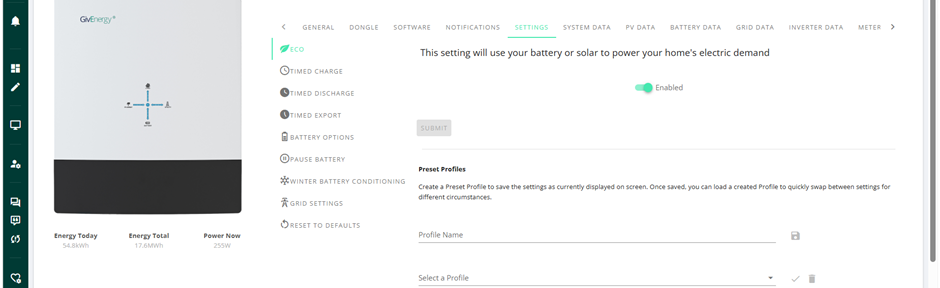
In HA you should be able to find Enable Discharge Schedule to enable an export.
Then Discharge Start Time Slot 1-10.
Discharge End Time Slot 1-10.
Discharge Target SOC Slot 1-10.
I considered doing a reset to defaults to see if that helped but worried that will make things worse. I just saw I can do a calibration on HA so set that to run and strangely smart meter monitor immediately said we were importing 3.5kWhs and portal said “charging” even though it also says 100%. I turned it off again as sooner start a calibration at 2am when it’s cheap rate if in fact it doesn’t have 100% in it. I already have export set to do so during peak payment down to 50%, but it hasn’t been doing the export since 19th when I first set up HA. But it also didn’t do it on 20th after I had removed HA and unplugged it. Yet battery has been at 100% all this time. Would the reset to defaults take it back to previous Firmware or software version on the AIO and/or Gateway?
A reset to defaults will change all the settings back to their defaults. You would have to set up charge and discharge slots again. It does not alter the firmware at all. Sometimes settings get stuck and don’t show correctly in the app or portal unless you use the refresh arrow to display the true setting.
In case it is of any benefit to anyone else. Having had the battery and Gateway constantly flashing green all week and not powering the house despite it saying on the portal cloud it was 100%. And on the screen with the dots that has the house in the middle and solar, battery and grid round the outside, there had been no dot going towards the house either. I don’t believe there is a calibration setting on the portal cloud. In the past I have had to ask GE Support to start a calibration. Obviously, no longer an option. But I found a start calibration on GivTCP on HA. Risked initialising that last night. And lo and behold it did discharge and recharge and this morning all back to normal, dot going to house, green lights on Gateway and AIO steady on and timed discharge (GivTCP) and export on portal started at the set time and took it down to the set percentage. Only thing was it only discharged 12.5kWhs and recharged 13.6kWhs. I was told by a well-known staff member at GE that a full calibration on the AIO should add about 16kWhs with it being 15.96kWhs actual capacity. I know they age but my cells are only 19months old. Goodness knows where the 12.5kWhs have been for the last few days, not powering my house, that is for sure. Or why it had suddenly stopped releasing the 12.5kWhs. Now just got to get my head around all the other settings on GivTCP, add some gauges etc. Thank goodness for STTG videos.
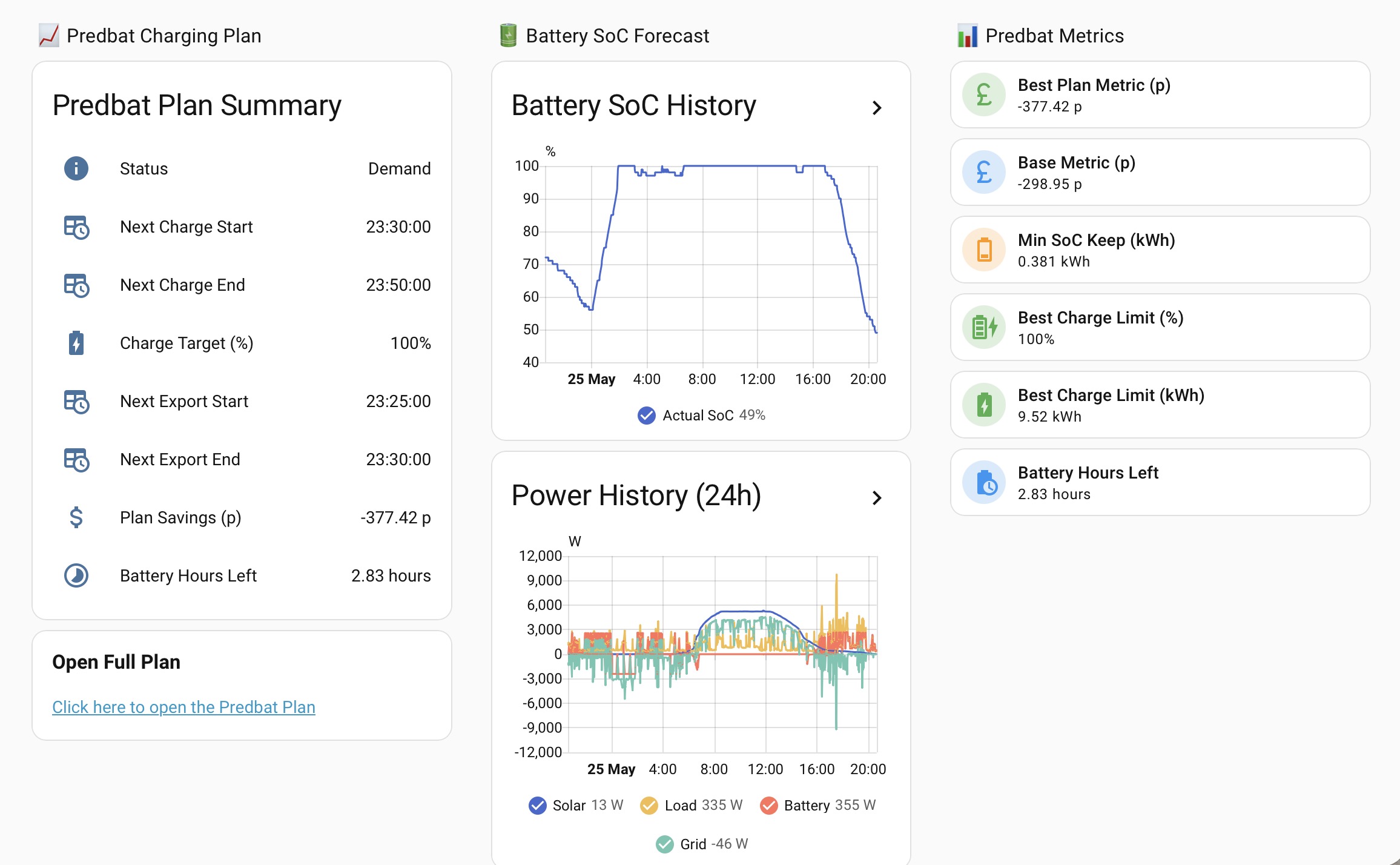
I strongly recommend using PredBat with Home Assistant. It runs my GivEnergy install for me seamlessly. If you struggle setting it up then I recommend paying for some Claude tokens. Run Claude in browser and it will setup predate for you, build dashboards etc, eg:
Thanks. Maybe I am reading what Predbat does wrong, but it seems to be something that controls my battery for me. IE decides when to export based on solar generation prediction. I want to decide myself when to charge and export.
My recommendation is to use My Energy Optimizer (MyEO). It allows sophisticated control of both charge and discharge when you want that to happen. It has been saving me money for about 18 months now and the developer is very open to suggestions for adding additional controls.
Changes to GivEnergy Cloud Service Access
GivEnergy have confirmed that from May 2026 a premium subscription is required to access the GivEnergy cloud / API.
This is required for MyEO to read and control your inverter. Without a GivEnergy premium subscription, MyEO will be redundant.
Further details have been emailed to existing paid for subscribers. If you have further questions please contact me via support.
But I am confused how Predbat and MyEO save money? If they are deciding when to export how is that different to me telling the battery when to export? During peak payment hours?
Just out of interest why do you need to control yourself rather than leave it to something like Predbat? I’ve found it to be very effective. It’s a bit of work to setup (especially getting the solar forecast piece to be accurate), but is very effective and saves a lot of manual fiddling.
As I said I don’t really know how it saves money? I can see it could be useful if your electric use is the same-ish every day, but I doubt it can predict when I would be using far more electric than usual on odd days.
And good luck to any app predicting the weather where I live.
Besides I’d imagine it would need an address - nah! Didn’t add a town even to HA. Location blocked on my laptop.
I am on set times cost wise for export/import rates so try to export during the top payment rate of course.
Been hard enough finding the time to set up GivTCP and not finished doing that totally yet. I started watching a video on how to set up Predbat last night and my eyes glazed over. No doubt I could do it if I really needed to do so but I’d sooner live a simple life! Right now, I should be gardening and enjoying this glorious sunshine rather than be indoors poring over a laptop. I’ll see how this GivTCP goes (hopefully, it’s not something that is going to be pulled, I don’t know if it’s anything to do with GE) and if necessary, start thinking about other apps when I have more free time.
Thanks for the advice though.