Hi, I’m wondering how people get the correct House Load and other figures in Home Assistant if you’re using 2 Hybrid Inverters. I have 2 x Hybrids with batteries attached to it, but I can’t figure out what I should put as the Home Demand inputs in the Energy Graphs. At times when I have a lot of solar for example, or when the batteries are discharging my House Load will show as 0. I’m therefore trying to find the correct ones that will always show the correct actual load for my House so I have reliable data for my hourly consumption to use in PredBat for example.
It’s not easy without directly measuring the consumer unit load, but here’s a sensor I use, which is fairly accurate. If you are not happy using custom sensors, you could add the template part {{ between the double curly brackets }} into a template sensor helper instead. Note that you only need to add one of the grid power sensors because they both read the same full grid power.
It’s basically House Power = Battery Power - Grid Power + PV Power
  house_total_combined:
    friendly_name: Total House Power Combined W
    unit_of_measurement: W
    value_template: >-
       {{ (states("sensor.givtcp_inv1_ea1111g111_battery_power") |float +
      (states("sensor.givtcp_inv2_ea2222g222_battery_power") |float) -
      (states("sensor.givtcp_inv1_ea1111g111_grid_power") |float) +
      (states("sensor.givtcp_inv1_ea1111g111_pv_power") |float +
       (states("sensor.givtcp_inv2_ea2222g222_pv_power") |float))) | round(0) }}
1 Like
Thank you for replying - I’ve added that as a sensor and will monitor it, but it already looks better than the one I tried to construct
1 Like
If what you are trying to populate is the Energy dashboard, then you don’t need any sensors for house load, they are automatically calculated from the other sensors (import, export, battery and PV).
If you want a ‘house load energy today’ figure on a custom dashboard then the approach @WillyReckitt describes and as per the predbat documentation apps.yaml settings - Predbat Documentation is the way to do it, except you have to use the separate battery charge/discharge energy today and import/export energy today as there aren’t net battery energy and grid energy sensors (at least on my gen 1 hybrids there aren’t)
If you want an instantaneous power sensor then the template Willy provides is all you need. …. BUT be very careful, this template will fill your home assistant database up !
The reason for this is that the template updates with a new value every single time any one of the underlying sensors changes, and that will be very very frequently so you will get an awful lot of sensor changes needlessly included in the HA database for the default 10 days or whatever you set your recorder history to.
There are some ways around this, either exclude that sensor from the recorder database so it never gets included, OR use a time trigger template that updates every X minutes. This will give a ‘good enough’ dashboard view without filling up your database as much.
here’s the one I use for load energy today:
# Home consumption sensor, updated every 5 minutes instead of the default of every sensor state change
- trigger:
    - platform: time_pattern
      minutes: "/5"
  sensor:
    - name: "House Load Today"
      unique_id: "house_load_today"
      unit_of_measurement: kWh
      state_class: total
      device_class: energy
      state: >
        {% set x=(states('sensor.g_xxxx_pv_energy_today_kwh')|float(0)
          + states('sensor.h_yyyy_pv_energy_today_kwh')|float(0)
          + states('sensor.fit_solar_energy_today')|float(0)
          + states('sensor.g_xxxx_battery_discharge_energy_today_kwh')|float(0)
          + states('sensor.h_yyyy_battery_discharge_energy_today_kwh')|float(0)
          - states('sensor.g_xxxx_battery_charge_energy_today_kwh')|float(0)
          - states('sensor.h_yyyy_battery_charge_energy_today_kwh')|float(0)
          + states('sensor.g_xxxx_import_energy_today_kwh')|float(0)
          - states('sensor.g_xxxx_export_energy_today_kwh')|float(0) )
        %}
        {{ max(x,0)|round(2) }}
also in a template, whenever you have a |float to convert the state value to a float, use float(0) so you don’t get an error if the underlying sensor isn’t available.
the max() bit at the end is to stop negative values around midnight
1 Like
That’s ok if a 5 minutes resolution is all that is required. The OP asked for a sensor that always shows the correct actual load. The sensor I suggested does this (including logging of power surges and dips). See the attached data captured a few minutes ago for example. Your suggestion would completely miss the 7kW surge (cooker).
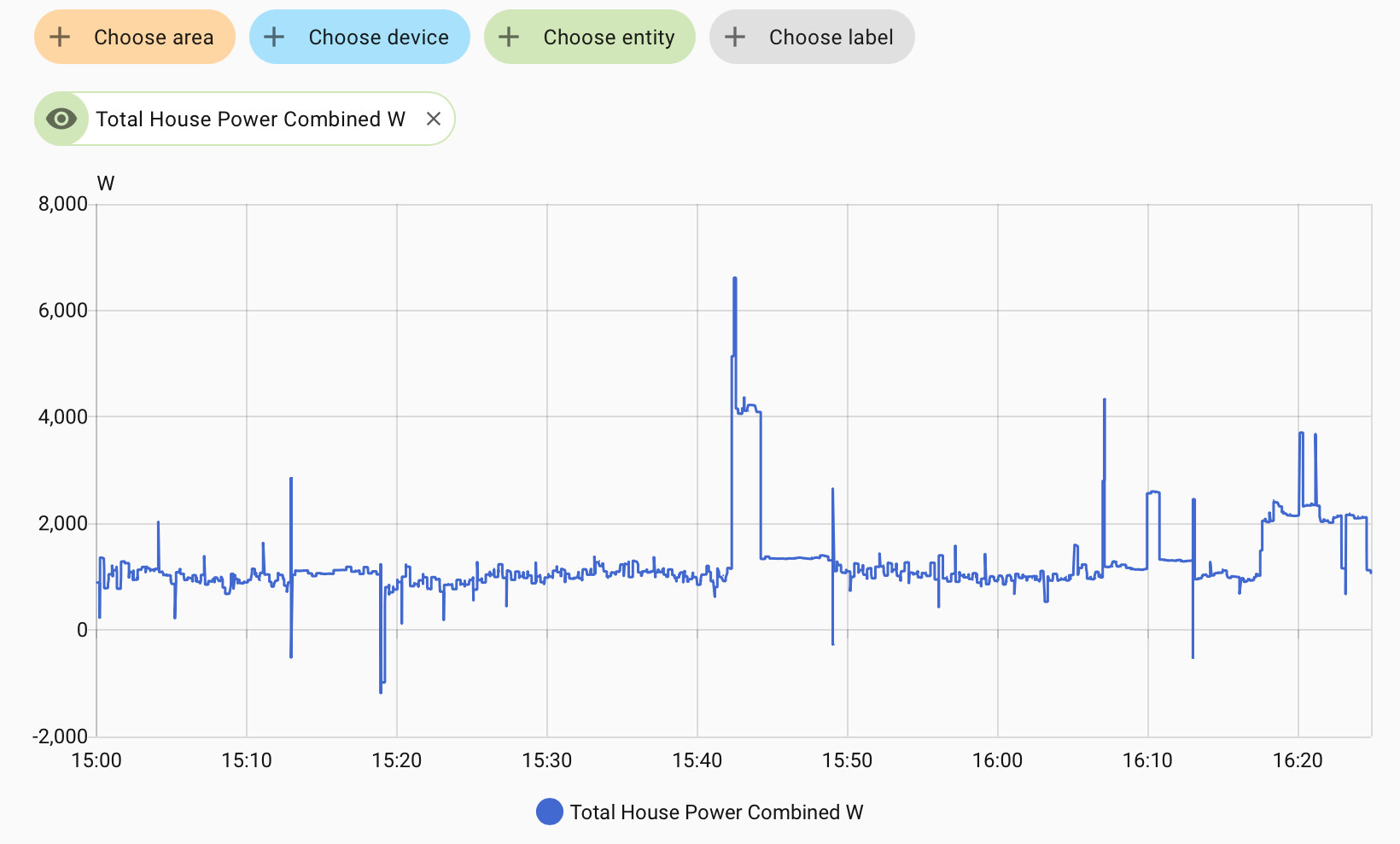
If it will only be used for hourly data figures, then I agree that some form of data resolution limiting could be applied as per your suggestion. Horses for courses.
PS using float(0) in this application is wrong because if the input data is unavailable, the resultant data will incorrectly use 0 as though it was genuine data. It is better to produce no data and an error message rather than producing incorrect data, in my opinion.
@WillyReckitt the OP doesn’t actually use the word ‘power’ or ‘energy’ in his request for help with house load, so its open to interpretation, but he ends with
which is a request for house load energy for Predbat, not power, so my example template is correct.
I stand by my comment on the care needed with instantaneous template sensors having spent a long time working out why my HA database was so big. One of the causes of this was template sensors giving instantaneous output values (especially if they were displaying values in watts not kW). The 5 minute template update was a compromise to reduce database storage whilst giving a sensor that was good enough for viewing on a dashboard, and sufficient for Predbat to predict future house load from
1 Like
Great if you are happy with compromise and using assumed values in calculations. Each to their own. The OP has 2 good suggestions to look at.