Hi all,
I have just moved house, which came with solar and GivEnergy batteries and inverter. I want to connect to the app/portal to manage the system, but I cannot find any information about what to do in this situation where ownership (of house plus kit) changes. I wouldn’t have expected this to be an unusual situation. Has anyone been in a similar situation, and how did you gain access to control?
Thanks
1 Like
You need to contact GivEnergy support and provide proof of buying the house and they should be able to create you an account to takeover the equipment. You will first need to reconfigure the inverters to connect to your wifi - videos on how to do this are on Youtube.
Really the sellers should have given you some sort of handover of the account details.
2 Likes
Thanks, I have managed to connect to wifi, it is now just waiting to hear back from GivEnergy support.
1 Like
Will be in the same boat in a couple of weeks and very interested to know how you get on. Given a few details of the plant and have been emailing GivEnergy support for ten days but no response so far. Also tried the installer who says he is busy until Christmas!
All I want is for someone to set me up with a portal / app account so that I can monitor, control and schedule the plant. I guess a key step will be to pair the system data logger with the (new) wifi once that is up and running. For sure this is not a simple plug-and-play procedure but I can’t find the idiots guide for how to take over step-by-step. If it needs intervention from GivEnergy Support can they please respond to enquiries. How are you supposed to demonstrate to them that you are the new owner?
In the meantime what is going to happen? Presumably the system will keep operating to the previously set pattern, which I think was matched to Intelligent Octopus Go tariff. Or, if the plant has been shut down in the meantime what happens if and when I try and switch it back on?
It all depends on how the previous person had it set up. If they were on Octopus Intelligent Go then likely they will have set an overnight charge on the inverter, and unless the inverter settings are reset the inverter will keep on following that pattern.
You’ll see if that is happening with your smart meter, you’ll see the overnight import occurring.
If an overnight charge isn’t programmed in (and the previous owners may have cancelled it before they left) then the inverter will remain in Eco mode which is where it charges the battery off solar when it can, and release the stored charge into the house when the house needs it to reduce grid import. This is all automatic.
You might be able to get the previous house owners to give you their login details for the GivEnergy portal which will be the quickest and simplest solution for you to take control. If not you will have to wait for GivEnergy support to do the transfer for you, but they have been very overloaded for months so your request is ‘in a queue’.
1 Like
The current owners declined to give me their login / password details, and referred me to GivEnergy Support.
The tariff is currently Intelligent Octopus Go, so presumably the GivEnergy smart battery has already granted access permission to Octopus in order to automatically control the import-export schedule according to the wholesale market.
I have asked Octopus if they can move me to Intelligent Octopus Flux tariff, and to do so using their remote access permission. In which case the system will operate and be optimised to my preference. Even without taking over the plant myself on the portal / app.
As you say it is a case of waiting for GivEnergy Support to respond. Is it worth trying to call them if they don’t answer your emails? Meanwhile I have appealed to the installer to see if he can set me up with an account on the portal / app himself.
Eeeek! Further reading on here and I’ve just realised that getting set up on the portal / app in order to directly control the plant (or bypassing it with remote control from an intelligent Octopus tariff) is probably the easy bit.
Then, in order to monitor performance on the portal / app, I will have to reset / pair the data logger dongle with my new wifi. Noting that I can’t use the oft-repeated trick of giving my new wifi the same name and password as the old wifi, it wasn’t mine.
The official video I have watched how to do this has left me stunned. Hugely complex lengthy set of if-then-else nested procedures, tricks, work arounds, stuff about frequencies and security protocols, direct internet addressing etc etc all way beyond my tech understanding. Good grief. Nothing like buying a printer where you press a wps button and it sets up the connection itself.
I cannot imagine I will be able to resolve this without getting the installer in. No wonder he said he was busy until Christmas, just after the two-year installation service warranty expires. £££££.
What are the macro options?
Cable the inverter to the new wifi router, so that if and when I manage to get set up with an account on the portal / app the data will simply flow directly?
Or forsake the abilty to monitor the system on the portal / app, and observe performance from my Octopus account charts? You don’t need the data stream for the system to operate normally do you, it is a just a window in to what is going on inside all the boxes. And trust Octopus to monitor and report accurately, well why not, that is the basis of the smart meter billing and we trust that don’t we?
Several questions here
Firstly on Octopus Intelligent Go that tariff only controls the EV charging. You have to manually set the battery to charge in the givenergy portal / app.
Octopus intelligent Flux is the only tariff where octopus control your battery activity and that’s not a good tariff for the winter as you’ll have little solar generation.
You need your inverter connected to the Internet either WiFi or cable as part of the warranty conditions.
Setting up the old WiFi isn’t that bad. Try accessing the dongle hot-spot. It has an ssid of the dongle address and the password might be the old house password or quite often it’s set to the inverter serial number printed on the side of the inverter.
And you need a portal account to set any manual controls on the inverter and for octopus intelligent Flux.
You do need to get the inverter on the internet for all these reasons
If you’re good with tech, one option would be control it locally.
Home Assistant and PredBat on a Raspberry Pi?
Or rubikcube’s app - that does local control I think, a small charge to open up that feature on the app.
Over the last couple of years, I have become an ‘expert’ and getting the dongle to respond.
I follow the GE instructions from here:
You will have to persevere. I found that the dongle often drops its wifi connection and I have to start again. The dongle software is something out of the stone age.
If necessary, there is a reset procedure (on Page 9 of the guide) which will clear the dongle of any existing credentials.
On the 1st page of the guide, you are asked to check your dongle number but this is at the back of the dongle. You have to remove the dongle to find it! I then took a photo of the number.
I would first see if I can get into the dongle using default passwords (in the guide). Initially admin admin. And later, it might be the serial number of the inverter (on the side of the inverter.
Best of luck!
Rob
1 Like
Chase
I have actioned your ticket, please reply there
But in short, the transfer is easy
download the GivEnergy App
create an account there, to which the inverter can be migrated to
When you move, your solicitors inventory will be your proff of ownership for the transfer
The inverter is still online, so i assume the current owner is still there.
As for the Solis inverter, you will need to contact solis
2 Likes
You also have mail
1 Like
Thank you to The Dragon and other helpful posters on here.
GivEnergy Support have now been in touch about onboarding, I have sent back the solicitors contents inventory showing the transfer of ownership.
The system will continue to operate in the meantime by the default setting and / or according to Octopus IOG tariff smart control.
Not looking forward to the wifi reset fun and games, nor getting control / monitoring the Solis solar inverter where I think the installer went bust. Bridges to cross when I come to them.
But meanwhile it seems I am on my way to getting an account set up with visibility and control of the GivEnergy battery and inverter, such a relief so thanks very much.
The good news is that GivEnergy Support have set up my account. I have had a quick look at the dashboard on the portal and through the app, guess I need to look through a tutorial to see how it all works eg where is the soc chart, today and history etc.
However, it is a bit curious because it seems like the battery is idle and flat. On the plant details it says the battery is 5.19kWh Lead Acid but I’m pretty sure the actual battery is 8.2kWh LiFePO4.
I don’t want to interfere with the controls yet, until I takeover on 12th November, so I’m just monitoring and curious why this might be.
1 Like
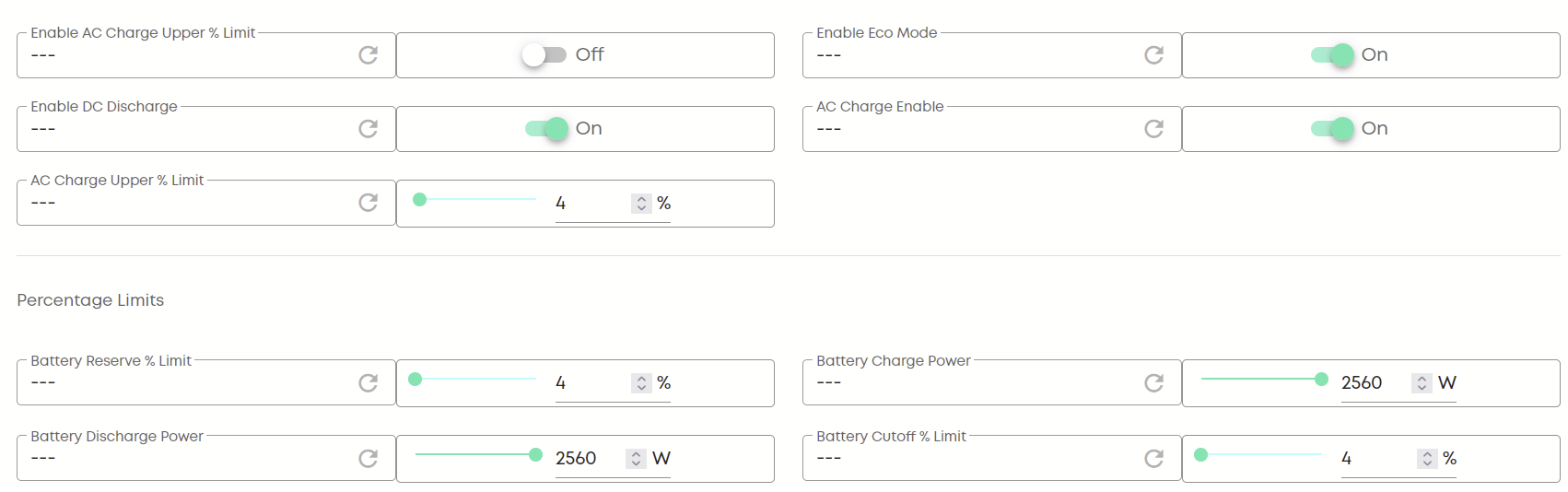
those settings look normal, except perhaps the charge and discharge rate; 2600W is more normal for a Gen 1 hybrid inverter
If you look at the charge schedules, is anything programmed there?
If the inverter is left in Eco mode then the battery will be charged from the sun and discharged by house load, so with reducing sun in the winter it’s quite possible it is empty. On the energy graphs do you see the SoC increasing during the day?
If the battery is totally flat then it usually has red lights on it, and will probably need givenergy support or your installer to resume it
Well who would have thought it, there are two inverters and now both have been added to the account by GivEnergy Support it looks like things are operating as intended. Fingers crossed.
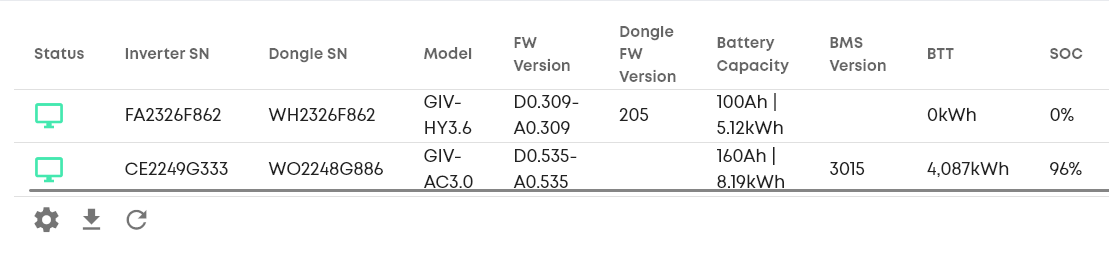
looks a bit strange. Says you have a hybrid inverter and an AC coupled inverter, both of which have batteries connected but the hybrid inverter says 0kWh BTT and SoC 0% which is weird
A hybrid with a battery, or a hybrid doing the solar and then an AC coupled with the battery would be normal.