My inverter settings are for overnight charging, 24 hour
discharge and no timed export. After using the Quick Settings to export surplus energy in the evening these permanent settings sometimes change, which is very inconvenient.
Has anyone else had this problem?
I have exactly the same issue! It started maybe two weeks ago after using Quick Settings for 5 years with no effect on timed charge settings. Now if I use Quick Settings to discharge it:
- Sets timed discharge to 00.00-23.59
- Deletes time charge
- Turns off ECO
- And sometimes turns off AC Charge Enabled, which can only be turned back on on the portal, not the app
Anyone know why this has changed now and what can be done to correct it? Very, very inconvenient.
Hi
I’m having very similar issues although I have attempted to change numerous settings within the app and in the cloud to no avail. What would be useful is a settings logic flow where we could work backwards and turn off or reset or delete settings.
I have a 16KW battery and an early inverter from around 2011.
Currently on Octopus Intelligent Go with 6.9p/kWh between 2300 and 0530.
No times discharge.
Signed up for Axle with a current API token
I have used the system for many years without any snags at all. I simply adjusted the Charge To % manually to suit the weather forecast for the next day.
I’m very keen to sort out this issue because the system needs my attention every single day when I wake up. I often need to enable the Eco setting and reset the Timed Charge hours which mysteriously and randomly reset.
Are you MartinCut and Robmac2026 willing to work on this with me on this issue to share successes or otherwise? (I have no technical expertise by the way.)
Have either of you signed up for GiveBack or Axle or similar? My understanding from reading comments in this community would suggest that these APIs can cock the settings up for instance.
Perhaps one of the community members could help me by advising about the following:
1 Does the Cloud or App settings take overall priority?
2 Does the App Smart Tariff setting override the Timed Charge setting or visa versa?
Any help greatly appreciated.
TIA
Hi SpitfireMcGuire
Yes happy to work with you on this, but at the moment I’m at a loss what to try next.
The problem has come from nowhere. I’m also on Octopus Intelligent Go with cheap rate between 23.30-05.30.
I have not (as far as I know) linked the system to the electricity plan I am on.
It seems to me something has changed in the software which means quick settings affect other settings in a way they did not before, but I am far from an expert.
Happy to receive advice r suggestions from anyone who has a similar problem, especially if they have solved it!
Report your bugs in the App and portal to premiun@givenergy.co.uk Givenergy Software Ltd are the new entity that are responsible for all Givenergy Software and the API since Givenergy went into administration.
I noticed the other day that after an accidental Quick session on the App, that it had interfered with other settings on my Inverter that it shouldn’t have.
I am guessing this is because the interim versions of the App they have pushed out to users to enforce the SSO login, have as usual not been tested properly.
This is the reason I pay for Wonder Watt. I wouldn’t trust Givenergy software for anything that you want to work reliably anymore.
Like Robmac2606 I’m happy to help but a relative newcomer to GivEnergy. My settings are similar. I have an Ohme charger for my EV which is connected to my Octopus Intelligent Go account but I don’t think that has anything to do with my battery.
I’ve reported my fault to premium@givenergy.co.uk
What are these alternative services that you’ve signed up to?
https://www.wonderwatt.com/ Register for a free trial and see if it works for you, great support, also you get answered, and bugs are fixed the same day usually.
Wonder Watt keeps a record of your settings before it changes anything and when the schedule ends, be it a Standard Schedule, Agile Schedule, or IOG schedule it sets everything back as it was previously. Costs £54 per annum or slightly more if you pay monthly. All scheduling is done in one place and it works like clockwork. If for instance your inverter goes off line due to say your Internet connection going down it automatically retries for you at 5 minute intervals, and if it fails after the third retry, it will send you a WhatsApp message so you can intervene manually. It soon pays for itself I can tell you.
Thanks, I’ll look into it. Presumably they can only help in the operation of your system and not if there’s a software problem?
Wonder Watt only can help with their software and its operation with your system, not with the GE App software or problem with you GE system hardware
There have been numerous reports of problems when using the Quick Settings buttons. If you are having problems then do a Reset to Defaults to clear all settings. You will need to set up charge / discharge slots again afterwards. You can find the Reset to Defaults option in the App by selecting the cogwheel (top right) or on the GivEnergy Portal by selecting My Inverter then Settings tab. It may be better to set a timed export to start at 19.00 and finish at 23.29. Then you can just go into the app and turn it on as you want, anytime between those times. You can then turn it off the next morning.
The problem is the “Reset to Defaults” option doesn’t work on every GE Invertor, same old story, poor software, never tested properly before release.
Am I right in thinking that Wonder Watt will operate my battery in a way that will reduce how much it gets charged overnight? Without this my battery is charged to 100% each night and then energy is exported in the daytime. With Wonder Watt, less energy would be exported each day?
Get a free trial at no cost and give it a try.
With Wonder Watt you can control it to do exactly what you want, when you want. For Instance I charge to 100% every day overnight, then export everything in steps down to 4% daily in the evening, before it all starts over for the next day. Other users have different requirements depending on the tariff that they are on, GO, IOG, Agile as examples. Every type of user is catered for. Some users use the the automatic solar forecasting for their location, which leaves space in the battery for solar generation. If you don’t like something you can turn it off.
You can even specify Charge and Export rates as a % and Give them Names, save them, and then apply them to your schedules. Here is an example of one of my export schedules that executes dependant on SOC % at the time of execution.
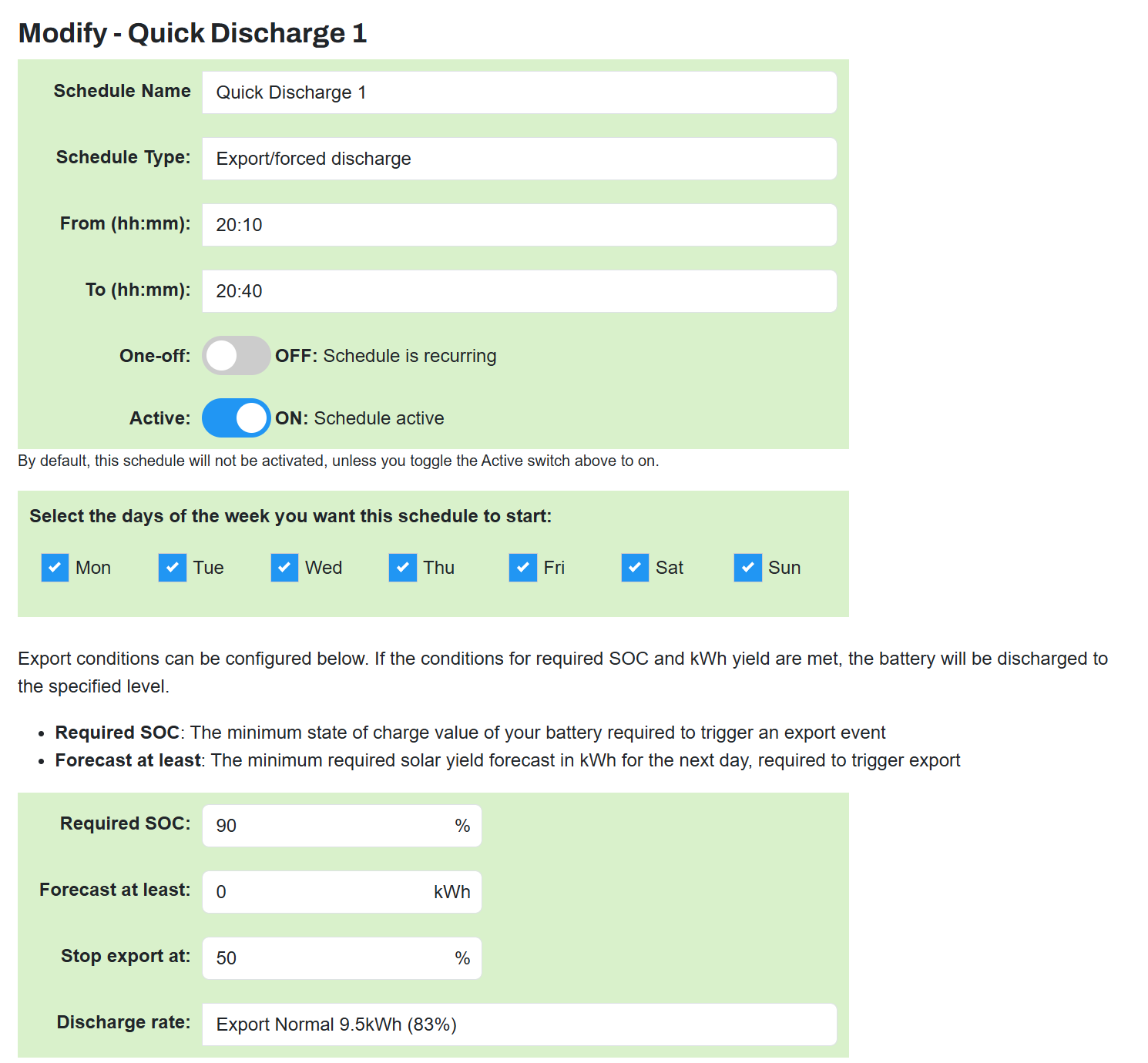
You can also create One Off Named Schedules that deactivate themselves after they have executed. Think Octopus Free Energy Sessions. You create two schedules Octopus Free Export (to make room in your batteries) and Octopus Free Charge (to slurp up that free energy). All that is different is the time they run from and to right. You save them as One Off Schedules, they will then execute at the time you tell them to then go dormant. They sit in your Schedule list (you can create 20) waiting to be re-activated the next time a free session is announced. Wonder Watt is Scheduling on steroids.
As far as I can see both the T & Cs of IOG and Axle prohibit being part of other DFS schemes. Apart from NESO issues any export will be being paid for by both companies.
1 Like
Hello again
To be clear I don’t use the “quick settings” on the app however I’ve had issues recently as posted previously.
It looks like I may have sorted my system out although It’s only been three days since I finished changing settings. Here is what I did:
1 I cleared all the data from my Smart Tariff - you can do this either on the app or the desktop (cloud). I used the app first and checked that the cloud had got the message. Your inverter at this stage knows nothing about the tariffs that you are on or the timings.
2 I deleted any API tokens via the cloud: Account settings - Manage Account Security (Top right yellow background) - Manage API Tokens. Delete them and then revoke them.
3 On the cloud via My Inverter - settings - RESET TO DEFAULTS - ensure that ECO is now toggled ON
4 Back to the app - from the Home Dashboard - settings (cog top right) - Rest to Defaults - save changes
5 You should now have a “clean system” with no input from anybody other than yourself.
6 I ensured Eco was toggles On again via the Home Dashboard - settings and then setup a Timed charge to the desired % from 13:30 to 05:30
So far so good and hope this may help those having similar issues.
One tip. When you have settings as you want them, unset RTC. This will force all current settings to be written to flash memory. Then turn RTC back on and leave it on. Now whenever you reset to defaults, the settings you saved to flash by turning RTC off will be restored.
I’ve decided to stop using the quick settings to force my battery to export to the grid. This leaves the Eco settings, charge and discharge, to work. The net result is that the battery charges overnight and most of the solar power is exported to the grid in the daytime. I realise that the setup could be tuned to be slightly more efficient but I suspect that this might introduce some instability to the system.