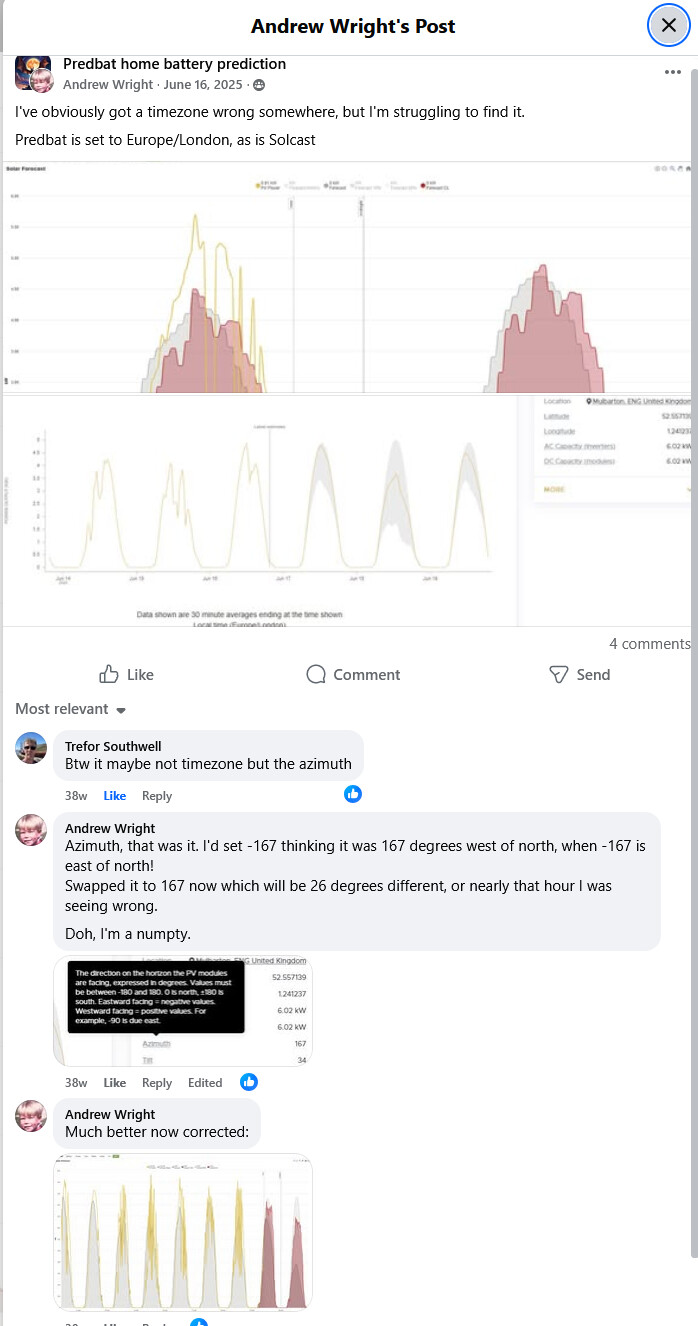
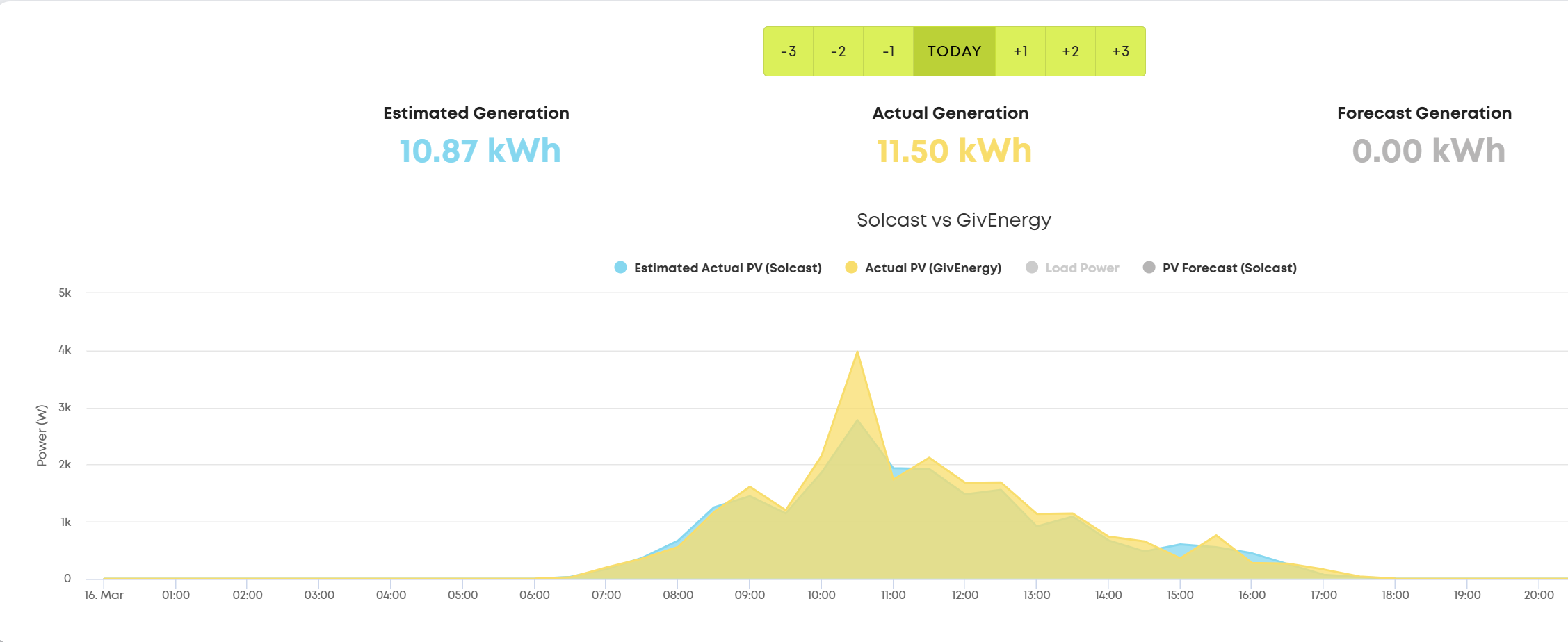
I was wondering why Solcast was off my actuals when forecasting and experiencing a fully sunny day!
Turns out, when setting up the installation on the Solcast website, if the azimuth orientation is to the East, that has to be -ve, or -1 to -179 degrees, or if West it has to be +ve, or +1 to +179 degrees.
I originally assumed it would be the other way around and hence the discrepancies.
Solcast is based in Australia so their definition of orientation is what’s typically used in the Southern Hemisphere
New users of the Home Assistant Solcast integration get this wrong quite frequently so there’s details and examples of how to get it right in the documentation BJReplay/ha-solcast-solar: Solcast Integration for Home Assistant and the integration checks for “does your orientation make sense”.
Of course your panel orientation depends on your house, so this can never be 100% perfect, but it tries
Ah, with the Australia connection it makes sense now. I guess you can accuse me of being northern hemisphere biased!
And now we are getting into sunnier times my system has started clipping (6.75kW panels vs 5kW inverter) and I’ve just discovered that, cleverly, they are separate inputs on the Solcast setup page. I’ve now entered them correctly! I should really take more care…
By the way Solcast has been unavailable for most of today again, 429 errors. If you ever want to see whether this is occurring you can look at this github issue and it’ll tell you:
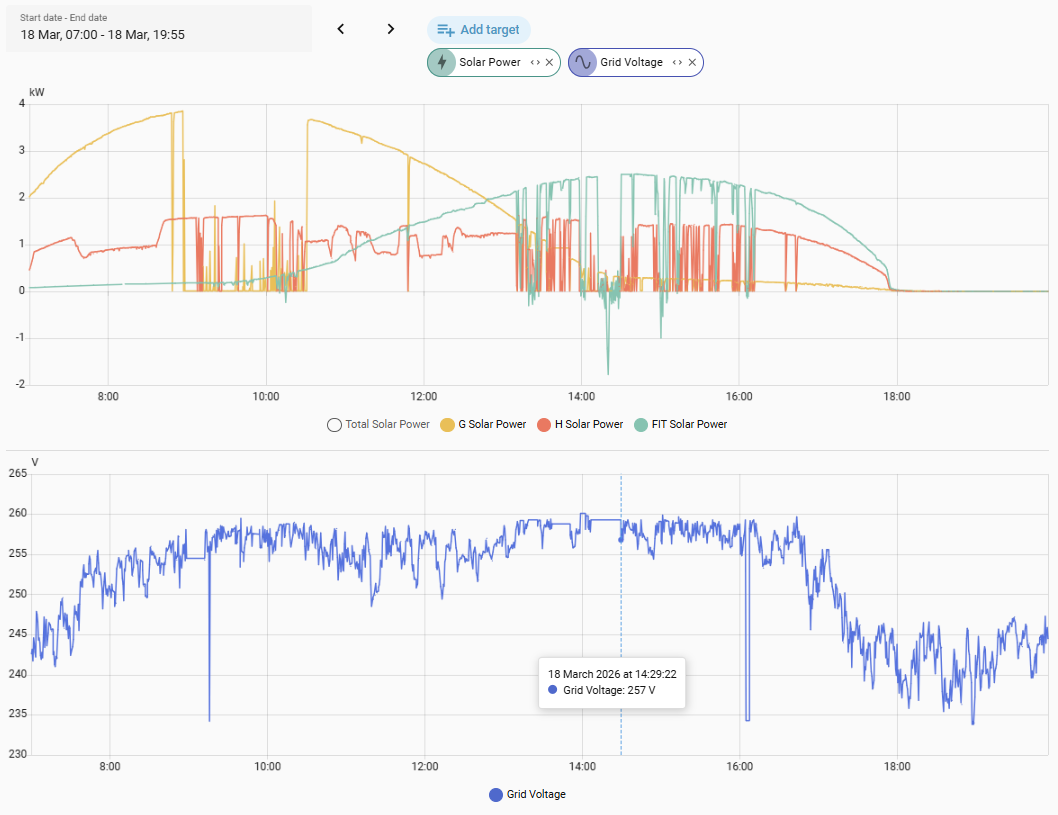
I too get clipping on my solar setup, but mine is a different problem, mine is that on sunny days the amount being exported drives the grid voltage up and that in turn shuts the inverters down. For most of today the grid voltage was around 258V, well above the 253V upper limit, and you can see the effect on the inverter power that drops off repeatedly.
Can also see the progression of sun across the 3 arrays
I chased my DNO about this issue again this morning. They’re supposed to be fitting a voltage monitor, but I know what the answer will be, they’ll need to re-tap the transformer down to a lower voltage which they did 2 years ago but the problem has got worse again
I’m trying to work out an automation for ensuring the ‘clipped’ power goes into the battery but still guarantees a full battery come sundown. Not dure how best to approach it, but I’ve been experimenting with the controls using the ‘ge_cloud’ integration (my GivTCP still sucks). I’m a bit confused by the controls available and it doesn’t seem to be changing just one will work. There is some cross-talk going on that I’ve got to get my head around - hard for an old duffer like me!
Anyway, I’ll probably settle on an automation that checks the Forecast PV Remaining every 30mins or so and then does stuff based on that and hours till sundown etc. I might be overcomplicating things though.
this is a surprisingly difficult task, and is a big part of why I gave up with my own automations and moved to using predbat to control my battery and inverter
the first part is actually understanding what controls do what, whether you are using ge_cloud or givtcp. The controls that are exposed are quite low level and there isn’t single controls that start/stop charging, etc. You need to set a series of controls to the right values, for example to start charging you set start time, end time, target SoC, charge rate and then turn on AC charge enable.
I found the best approach was to use the givenergy app, start an operation and then see what controls changed. I then wrote these into a script so I could call the script whenever I wanted to from an automation.
the second part is working out what charge level you want, to do that requires looking at forecast solar and taking an estimate of house load. You don’t want to waste energy by charging the battery when you could export it, but equally you don’t want to loose energy by it being clipped
and if you want to get even more sophisticated, take into account charge/discharge and inverter losses which can amount to 10-20% round trip
as I said, I started with predbat more than 2 years ago. At the time it was much more of a black box with limited documentation. Its grown a lot in that time
but writing your own automations and solving problems like this is kinda fun
I’ve just realised that when i turn Eco mode off the battery neither charges or discharges. This was fine during full on sun but when it goes behind a cloud the load is supplied by the grid!
I want battery charging to stop but i still want the battery to support the load. What settings will ensure this?
I’d like a detailed explanation of the settings and any interaction between them; is there such a thing on-line? I haven’t found one.
there is unfortunately no detailed explanation of the inverter control settings that I have ever found, we’ve had to work them out from observation
If you turn Eco mode off then the inverter stops responding to house load as you’ve found.
To let the battery discharge but not charge you need to leave Eco on (generally never turn it off), and then if your inverter has battery pause mode, set it to Pause Charge, or if it doesn’t, set the charge rate to zero.
To resume charging from solar, reverse these settings
Thanks Geoffrey. I’m playing with it now though it’s frustrating with a 5 minute reporting cycle and the sun coming and going. I have the pause charging mode with start and end times, but i think it will be easier to just use the charge rate setting. I’ll let you know what I end up with.
If you use the givenergy app and set it to local mode it will update more frequently.
Or install the BBC Basic ‘inverter’ app , enter your inverter IP address and it refreshes every 30 seconds.
Or install Home Assistant and GivTCP on an old PC (can create a virtual machine for it) or a Raspberry Pi and you can poll the inverters every 30 seconds.
I have both the second and third. Never really use the givenergy app or portal these days
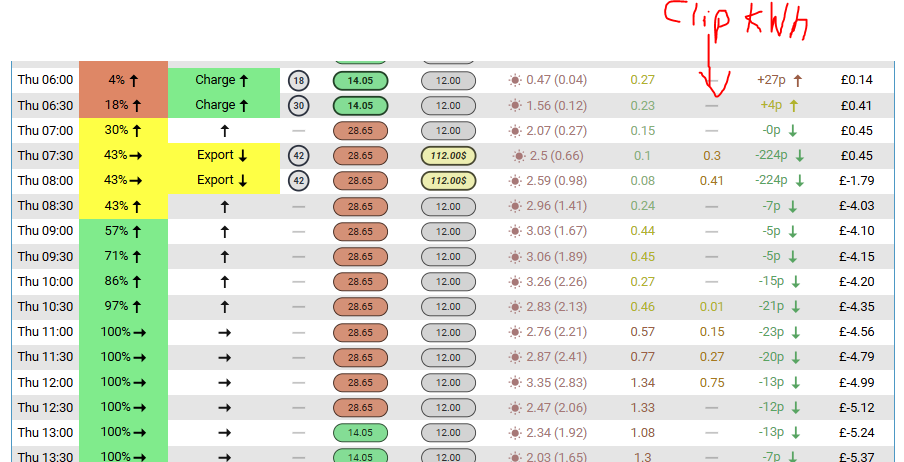
Its not particularly covered in the predbat documentation, but if Predbat detects that clipping will occur it will reduce overnight battery charging or where necessary will export the battery earlier to give space to avoid clipping
I have artificially reduced by inverter throughput limits to encourage predbat to do this more, and you can see clipping being identified both at the peak of the day and during the Axle session export:
Since having the install in December, the App has struggled locally and GivTCP/HA also. I’m waiting for a new inverter so am getting by with just the cloud working atm.
 · BJReplay/ha-solcast-solar · Discussion #400