I am trying to test out the Timed Export Function.
My Battery has a Reserve of 10% set.
I set a timed export for 2hours and a export to of 30%
I expected the battery to discharge down to 30% leaving me some battery capacity to run off ECO mode. But what happened was …
Battery discharged to 30% inside / before Timed Discharge End with 30 mins to go
ECO Mode didnt restart when battery stopped discharging at 30%
Inverter started importing from the Grid at Peak charge rate.
Eventually the Timed Export End Time was met and Eco mode was restarted.
This kinda negates trying too export some solar/battery power when grid needs it between 4:00pm and 7pm as users risk importing at peak usage and rate times.
Is ther no “If” Battery discharged to Timed Export limit “Then” Timed Export terminates and ECO mode restarts if set by user.
you have fallen into the common trap of misunderstanding how timed export works
When you set a timed export, the export occurs until either the time ends, or 30% has been reached.
But if the time has not been reached when 30% lower limit is set, the timed export still takes precedence over Eco mode, the battery cannot discharge any further as you have set a lower limit of 30%, so yes, as you have found, it will grid import until the time has expired.
This is probably not what you would want for a Flux peak rate export, but is entirely logical.
It is the way it works, there is no way around this, this is the way it behaves. The only way to reduce the impact is to start the export at such a time that you don’t hit the lower limit before the end of the time period.
Having said there is no way round this, there is, but you’d need to use an external automation to calculate when to start the export, you can’t do it in the givenergy app/portal.
By the way, why have you set your reserve at 10%? It’s normal to leave it at the default 4% lower level to use as much of the battery as possible. If the battery hits your reserve you will start importing.
Only reason to increase the reserve is if you expect a power cut and your inverter is wired up to act as an emergency power supply/whole home backup as during a power cut the reserve is ignored. But for normal use, leave the reserve at 4% as otherwise you are just wasting that battery capacity
I understand that you say this is just how it is, But to be honest its not that usefull.
Ideallly the % Export Limit should take preference over the time slot.
In its present form Timed Export can only be a manual process,
You cant automate reliably as If you had a cloudy day and used most of your battery , you want the % Export Limit to Stop Timed Export and leave you in ECO mode.
Not cause an Import from Grid at peak cost.
BTW Battery Settings have a User Reserve Setting ie your 4% or my 10%,
Timed Export has a Battery Export To - Level,
Are these the same user setting of different states?
If they are the same ideally this should be made clear.
Thanks for the explaination though, even if its very disapointing and illogical function.
As you suggest maybe there is an external way of auto checking battery state of charge and working out if its safe to do a Timed Export, and implementing that but not many users have that technical ability, I would guess.
I don’t know what the thought process that went into Timed Export working the way it does, but it was designed this way in the first GivEnergy inverters well before smart tariffs like Octopus Flux came along with different import and export rates across the day, so I guess grid importing when the export stops just wasn’t a consideration.
There are lots of different ways of automating your battery activity over and above the simple charge and discharge schedules in the app/portal. I use predbat which takes account of predicted and actual house load, solar generation, battery level and import and export rates to optimise my battery and charge and discharge in peak and offpeak rates. It works extremely well but does have a bit of a learning curve.
I started out on Octopus Flux but moved away from it after 6 months or so as the rates got steadily worse. The day export rate for example is now less than the standard 15p export rate you get on any other tariff, so for summer unless you can export lots in the peak, isn’t worth it. The peak export you have to be absolutely sure you have enough charge to take you through to the next overnight cheap period as importing in even the evening rate will wipe out any extra profit made from peak export.
And on your question on discharge to %, on my inverter, yes they are the same and that is probably the root of the issue as the battery reserve is the level the battery can’t discharge below. For newer inverters they may be different levels, I don’t know
I had the same problem recently, to my horror I discovered I was importing at the peak time! I’d assumed this was an error until I saw your post. I’ve now had to resort to manually exporting which is less efficient.
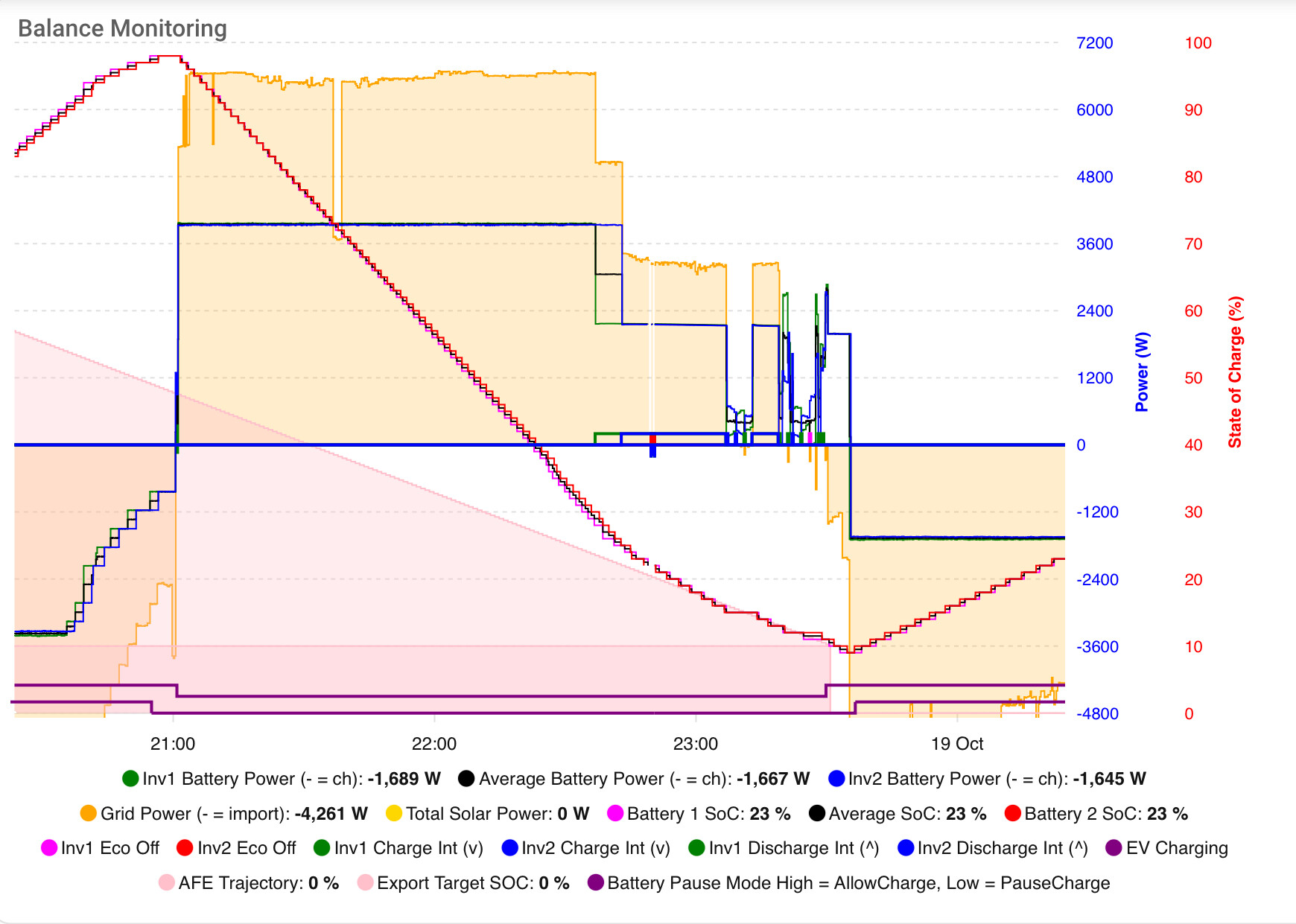
There are even better ways of hitting target percentages at a given time than any of those mentioned so far. I use my own HomeAssistant automation to modulate controlled exports. Here it is from last night hitting 10% at 23:30. Note that this is two separate inverter / batteries and the same automation also keeps them in balance by adjusting the individual export discharge rate as required.
For this newbie this thread is extremely helpful - thanks to @geoffrey and @PhilBoucher (for the question and with whom I agree about the illogicality).
As someone not yet ready to jump into the external programming solutions, can I ask a related question about the GivEnergy cloud settings.
On the inverter settings tab, under “Grid Settings” it says “Modify various grid-related settings such as import and export limitations” (my highlight). But the slider on this page moves to a “Grid Export Limit”. My question is - where is the grid import control?
Thanks in advance.
I agree, Home Assistant is by far the most superior way of achieving fine control over your imports and exports, and do things like balance multi-inverter plant systems.
For many people though this is beyond their technical ability.
The inverter settings page gives a more user friendly way of controlling the inverter, the actual inverter controls that are manipulated are on the remote control page.
It sounds like you have a newer inverter than me, I don’t have a page for grid related settings. For me the only control is to change the battery charge and discharge rates, there’s no direct grid control options.
I’m guessing what you are seeing is a bug on the inverter control grid settings page. Look on the remote control page to see if there is actually the control you are looking for
Thanks for update
Installing HomeAssistant on my Synology Nas today.
Yes I have the new 10Kw Inverter and 10Kw DNO to play with.
Only problem is it appears my installer and Givenergy having problems setting my Grid Expoert limit to 10,000W or 10Kw, currently restricted to 6kW, not what I paid for , hopefully fixed soon.
I see you have posted this on github as well; and I have answered you there. But in short, GivTCP is playing catchup with newer inverter hardware and firmware. Support for High Voltage and 3 phase inverters is work in progress; but please post on github, and try the dev versions of givtcp as they are released as its only people who have that kit that can feedback on any issues.
This thread is about Timed Export function, can we keep it on message please, otherwise we risk being sidetracked
TY will try the Beta version.
Have high hopes for the new Givenergy HV Inverter and batteries there are some very good aspects, especially speed of charge and discharge. As you say needs some catchup.