I’m a newbie here so apologies if this is wrong section of the forum. I’ve just set up homeassistant in a virtual machine on my pc and everything seeme to be working fine. My dashboard is very basic and I’m playing around. I have always got into a mess when trying turn my givenergy system off and then on again, either by the app or the cloud. For instance, when there is an hours free electricity I turn my system off and change my EV for an hour and then turn the system on again. (My system being a gen 1 inverter and two batteries). I am attempting to put an on/off switch on my homeassistant dashboard. I have the switch showing and the MQTT control configured is Enable Charge Schedule. Is this the right entity to turn my system off and on? Any help appreciated.
I’ve just added a battery discharge button - using the givtcp element number.givtcp_sa2104g071_battery_discharge_rate
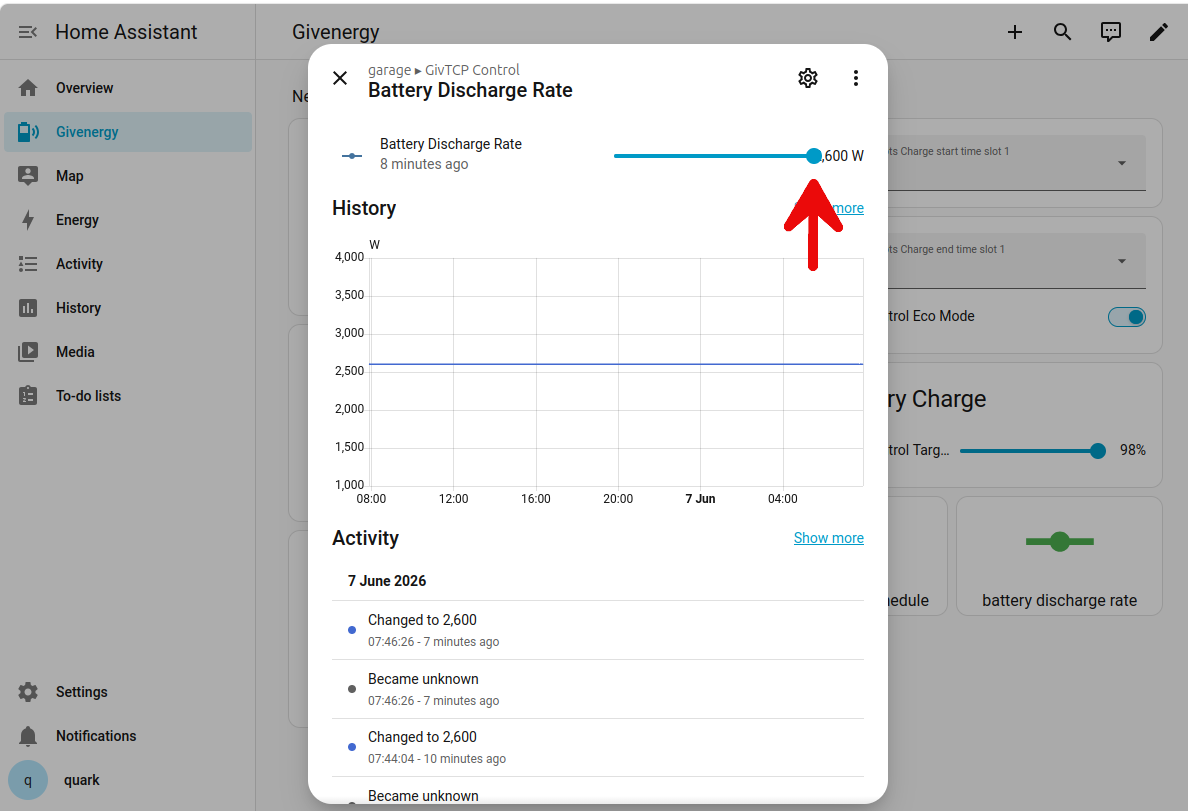
To turn ‘my system off’ as such, do I just slide where the arrow is all the way to the left?
Personally I’d consider either charging your battery in the free electricity period, at a low charge rate, which you can do with some automation in Home Assistant.
Failing that, you can just use the “Battery Pause Mode” option and set it to “PauseBoth” so it will neither charge nor discharge; thus running your system from grid power. Just don’t forget to set it back again!
Thank you - that is very helpful. My situation is where, in the summer, my battery is 100% (due to solar) and there is a free 1 hour session. Obviously if I just plug in the EV it will drain the battery - I like your suggestion of using Pule Mode. Thank you.
Welcome to the Home Assistant rabbit hole 
The real strength of HA is getting it to do things so you don’t have to. Have you researched if there is an integration in HA for your EV or wall charger?
If there is, and if that integration has a sensor that reports when the car is charging, then you can build an automation within HA which monitors that ‘Car is Charging’ sensor and sets the GivTCP ‘Battery Pause Mode’ to prevent discharge during a car charging session, and then enable discharge again when it finishes.
It can feel like a lot to get your head around HA initially but take your time. When it works the first time it feels like magic 
Why switch it off? Surely it would be better to top the batteries off if the power is free!
If you importing to charge your car, you can’t export anyway, so I don’t understand why you’d want to switch a system off completely anyway.
I know from, probably too much experience, that switching electronic systems on & off is how many faults are created, electronics simply doesnt like the voltage & current spikes generated, they don’t need to be massive but logic systems use low voltage DC, around 5v or less internally, & the spikes generated by switching, while they might only last microseconds can easily reach 1000’s of volts.
I will only switch my systems off if I absolutely have to.
Thank you all. I’ve come to realise that ‘switching off’ is not the right approach. Normally when Octopus offer a free hour my batteries are full so normally I use that hour just to top up my EV. I’m now looking at simulating the Pause Button on the homeassistant Dashboard. Yes - ha is a bit of a rabbithole but hopefully I will get there.
I vary the battery discharge an charge rates to accomplish this. Assuming you’re on octopus you can install the octopus integration for HA and pickup the free session status from its entity to automate the whole process. Also works for exporting automatically during saving sessions.
With regard to having full batteries and not being able to charge those during the day. I get around this by discharging in the morning after a full charge overnight. I use a solar prediction integration to estimate solar generation for the day, and based upon that start a discharge before the sun comes up (earlier start if sunny later start if no so much). This gives some headroom for charge in the batteries for any excess solar to go thats above my 5kW export rate and for any free elec. if there’s a session.
My batteries are rarely full, either charging or discharging and I always export all solar unless the inverter is capping and then the excess goes to the battery (I believe this can only be done with a DC coupled inverter however).
I don’t know how many time slots you have with a gen 1. If just the one is there any reason you can’t change the times in anticipation of the free hour or two hours? If you know how many kWhs you would import in an hour to charge your batteries, change the export (discharge on GivTCP) time to before the free hour to get batteries down to the percentage required and set the charge time to the free hour to get it back to 100% or whatever from the grid for free. And set the EV charger to top up the car during the same hour from the grid. If the battery is set to import whilst it’s not back to 100% or whatever percentage you have set the target to before the hour is up that shouldn’t start draining the battery to charge the car. That is what I do with an AIO, although we have ten possible charge and discharge timeslots. Just remember to change the times back or cancel them after the hour. Usually, the free hours are on a good solar day so solar should power your house whilst discharging the batteries before the hour. Only thing I have to be careful of is ending up importing over 18kWhs during the hour, which trips the Gateway. I have discovered the hard way, that charging car at 7kWhs, battery at about 6kWhs, oven on self-clean. dishwasher and washing machine on, hob on and/or iron etc may take me over 18kWhs for a minute or two! Have to task the other half with watching the smart meter monitor as I turn things on. Usually ok if the car isn’t charging too.
If you have more than one timeslot it will be easier as only have to set up the 2nd slots and remember to cancel them afterwards, no need to touch your usual 1st times I’d imagine.
Timeslots is a “device” on GivTCP. You’d also need to slide up or down the charge/discharge target percentage which is the device called GivTCP Control.
I have also had to get my head around setting up dashboard and gauges. Followed Speak to the Geek Youtube videos which helped a lot. This is my dashboard if it helps:
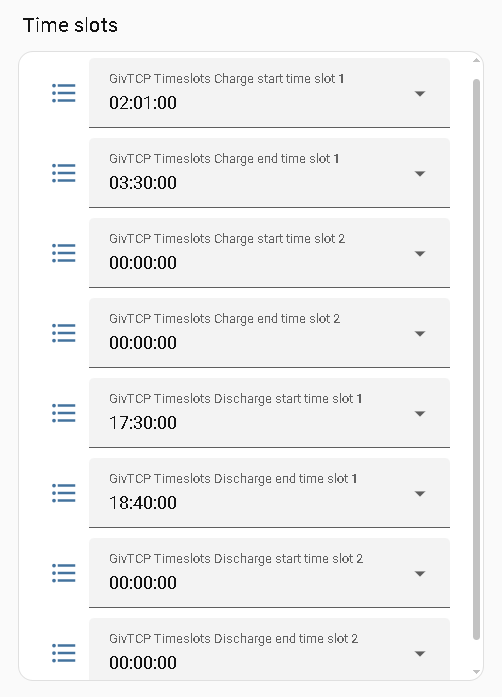
![image|221x500, 100%]
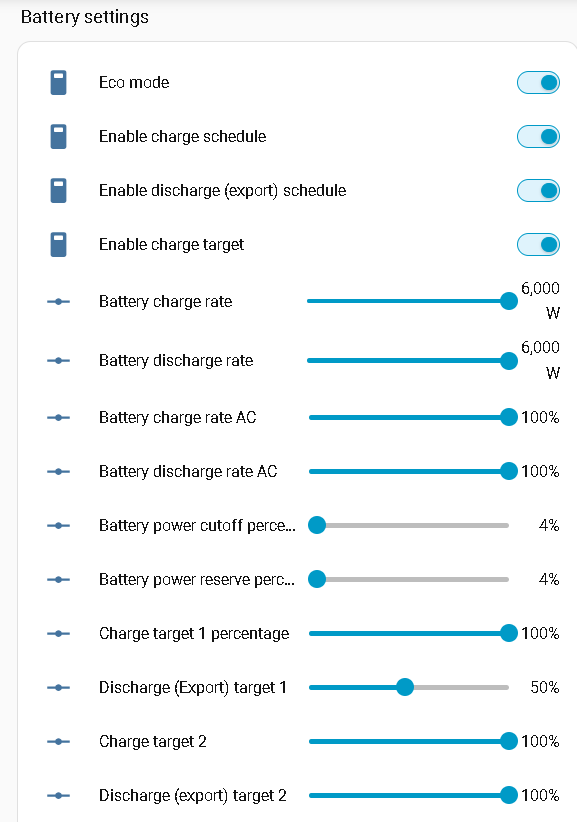
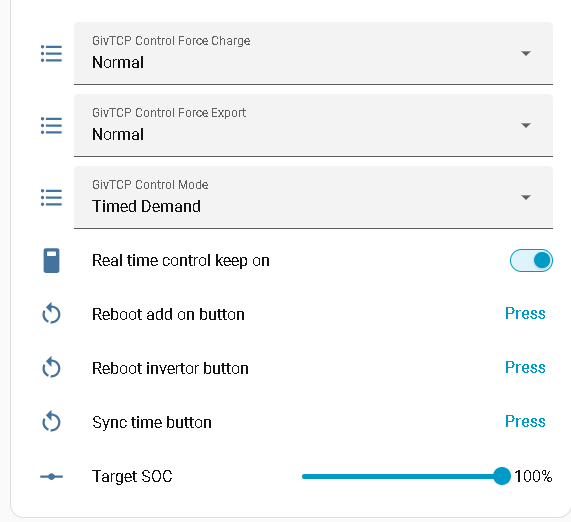
To be honest I don’t think I need all of these, but it all seems to be doing what I want it too when I want it too so left it as I set it up to start with. I don’t do anything on a phone, it’s all on a laptop. Hope this helps with the free hours.
I have changed the title on some to make more sense to me. If you want to know on which GivTCP device any of my battery settings are please reply.
Sorry I haven’t got back sooner. I have a terminally ill wife so my time is very limited and I cannot respond here as frequently as I would like. May ‘turn left’ a little? I have a timed charge set up which is 00.30 to 05.30 using my Octopus Go tariff so that my battery charges at the cheaper rate. I have also been trying to set up a slider on my homeassistant dashboard to change my target battery soc. (Before the collapse of Givenergy I had this set to 80% but now I want to change it to 100%). I have been using AI to set this up but although I have a new target set to 96% my actual battery appears to still be on 80% (hence the dashboard shows the current battery level as 74%). AI is helping me again and sees some issues but it is telling me to:
This card looks close, but it has one major issue that will prevent your battery from charging overnight: “GivTCP Control Eco Mode” is currently turned ON.
In GivEnergy systems, Eco Mode tells the inverter to operate entirely on its own intelligence—meaning it will only charge from excess solar during the day and discharge to power your house at night. When Eco Mode is active, it completely overrides and ignores your overnight time slots.
I am nervous to do this as my Givenergy system has always been on Eco Mode and worked fine re the battery charging during the early hours. I have a very simple Gen 1 set up. Octopus Go to getting 00.30 - 05.30 charging, solar topping up battery during the day and excess exported to the grid. Any advice on this switching off Eco Mode appreciated.
I have just had a ‘reasonable’ explanation from AI re my question above. I will make a change today and report back. Sorry to bother you.
I believe that on the Gen1 Inverter that ECO had to be turned off to charge or export from the battery.
You could set up an automation in HA to Turn Off Eco at 00.30.
Then another automation to Turn On Eco at 05.30. The house would be running on the cheap rate during these times anyway.
I have a Gen3 Inverter so I do not have to turn off Eco. I just have to set the slot time and then turn on AC Charge Enable.
Why are you turning it off?
I can’t see any benefit but I can see it causing an increase in the likelihood of problems in the future. (I was a maintenance engineer for decades, so trust me, switching electronic systems on & off more often than you need to, especially inverters/rectifiers as we have, is almost guaranteed to cause more problems than if you weren’t switching it on & off as frequently
That makes no sense to me, can you charge your batteries instead, just set a timed charge for the same period of free juice?.
You can pause your battery, although I don’t know what effect that has tbh. I’ve never used it.
The first time there was a free session I plugged in my EV and manually charged (normally it charges over night at the cheap Octopus rate along with my Givenergy batteries) and without thinking it through the EV obviously drained my batteries as well as charging off the grid. So, in future free sessions I use to effectively stop my batteries from charging and then manually charge the car. I must confess I got myself in to all sorts of trouble using the app and found it easier to log into the cloud and reconfig the iverter to stop charging. Now we have lost the cloud I have set up homeassistant. After some heartache I have now got it working with my gen 1 system. I have successfully changed my battery SOC target from 80% (which I set before the Givenergy collapse) back to 99%. What I need to do now is put a slider, or something on the dashboard, that will set the battery charge rate, so I can manually stop it charging for a temporary period. The issue for me is identifying exactly what GivTCP element/sensor actually does this. Does this make sense?