In the latest email update about Free or Premium it advises that to protect EV charger we should do the following. (States no expectation of EV Charger Servers going Offline - but if it does and charger is selected with plug & Go there will be no way to get it out of this mode).
Use ID Tags - I struggled to register mine but maybe should go and try this again.
Set scheduled charging on the EV charger and disable plug and go. Says if car supports timed charging - set 7 day 24 hour timer on charger and more precise schedule in the car - I will try this and see if it works. Disable plug & go.
Plug and Go will not function if charger goes offline - which we all know.
TBH - if the new software co can make the EV charger Octopus Igo Compatible and work like this flawlessly - that’s about the only reason I would pay the £5 per month charge. Don’t know what others think.
I use Axle to control my home battery in times of grid requirements - they guarantee £10 per month export income from the £1 per kw export rate during these periods. Says on email Axle will b paying for the API access. I also use Octopus labs - not sure if OE will also pay for this API access.
It doesn’t say that Axle will pay for API access. It says that energy providers will be charged separately. Axle is not an energy provider, so you will need to pay the premium tier if you want 3rd party API access.
You might need to keep an eye out on the GivTCP groups.
Already a full featured local EVC server is built and in testing. @djbenson has achieved so much.
Im confident if the worst happens, its covered
It’s still work in progress as I haven’t tested every feature but I managed to find a way to intercept the traffic between the official portal and my charger and the result is what this integration does.
I’ve been using it for a week (which is basically its entire lifetime ) and it works great for me - I’m using Predbat to schedule charging so basically only needed an on/off switch but it does more for those who need it.
Thanks - I am sure there are so many very knowledgeable people with GivE equipment out there, we will somehow be covered, but many people have no tech no how at all. I would say I am reasonable with tech, but have not ventured into the home assistant world - not yet anyway, but see Speak To The Geek has already released a tutorial for this and GE equipment.
If my 9.5KW Gen 1 battery had been compatible with AIO, I would already have been moving to an AIO, but don’t want to lose my 9.5 battery which is under 3 years old.
Also was told by my installer I could not have my current inverter/battery running alongside an AIO, operating as inverter (could have added more panels too).
Been struggling to get my car working with Igo - due to poor 4g signal. I have bought an Indra Smart Pro charger which I will have installed, so will also keep the GE one and have 2 chargers to choose from.
Just a word of warning, and I don’t mean to shit on another member of our Giv community, but the advice on the EVC in STTG’s video was wrong (as confirmed by Giv themselves in the email yesterday). The “Plug and Go” workaround won’t do anything as that feature is managed by the portal (my integration has it too - the software basically monitors the connector status and when it goes from “unplugged” to “plugged in” it initiates a charge).
The rest of the advice from Oliver/STTG is solid.
Your options right now are;
Do nothing and trust Giv that the servers are staying and the EVC will remain on the right side of the paywall
Set your charger to “dumb” mode by setting a 24 hour schedule as advised in the email
Spend 10 minutes reading the guide on my GitHub repo and get your charger off Giv’s cloud (you do need Home Assistant though but there has never been a better time to get sorted than now - for peace of mind you need Home Assistant running the show).
In the end I’ve decided to retain an overnight charge window that sits within cheap rate window (mine is Ecotricty so is either midnight to 5am or 1am to 6am depending on whether it is winter or summer so I have set it from 1am to 5am) and then rely on the RFID tags, which I’ve registered and which work. I want the overnight schedule if I just leave the car plugged in and can use the tags to override if I want more.
I struggled to register my ID tags but succeeded following help from @daveb01 link to post here - following his instructions precisely (as clarified by my questions) worked for me: RFID tags not working
Are you saying that, “plug and go” does not work if thw wallbox is OFFLINE, or can not connect with wiffi network?
This does not make any sense but, ok
The workaorund to use the EV charger without wifi connection/offline is:
disable plug an go
enable scheduling for 7 days from 00:00 to 23:59?
Can you or someone please confirm this?
NOTE: As I gave my wallbox to a friend, I need to know to inform him how to proceed
I have tried my EV Charger with the suggested settings and it works fine. What has been said is that if the GivEnergy EV servers are switched off for any reason, the charger will go offline, and if Plug and Go is selected to ON, the charger will not work and you will be unable to change this setting as it is done via the online servers.
The whole “Plug and Go” thing started as an (incorrect) “tip” on how to prepare for dooms day - IF the Giv portal went offline, how could users continue using their product.
“Plug and Go” is basically a simple automation, the server watches the plug status and when it goes from “unplugged” to “plugged in” it sends a charge transaction and charging starts immediately.
The issue with this is;
That “automation” runs on the server, not the charger - multiple technical reasons exist why this is the case
It runs once per state change, so if you plug in, then stop the charge, it never fires again until the car is unplugged and plugged back in again
So relying on “Plug and Go” is a false economy. No server = no function and with no other way to start the charge, the charger is “soft-bricked”.
Ways to really protect yourself from “dooms day” are;
Without a connection, the charger won’t receive time updates so two things will happen;
Any schedules will drift -/+ an hour depending upon whether they were created inside or outside of BST (UTC+1…the charger maintains time in UTC - it has no timezone)
It will probably slowly lose accuracy as computer time, unless sync’d, drifts…
If the charger is left in “dumb” mode prior to losing connection, neither of those things matter as the 24hr timeslot will keep the charger awake and scheduling will be done off-charger.
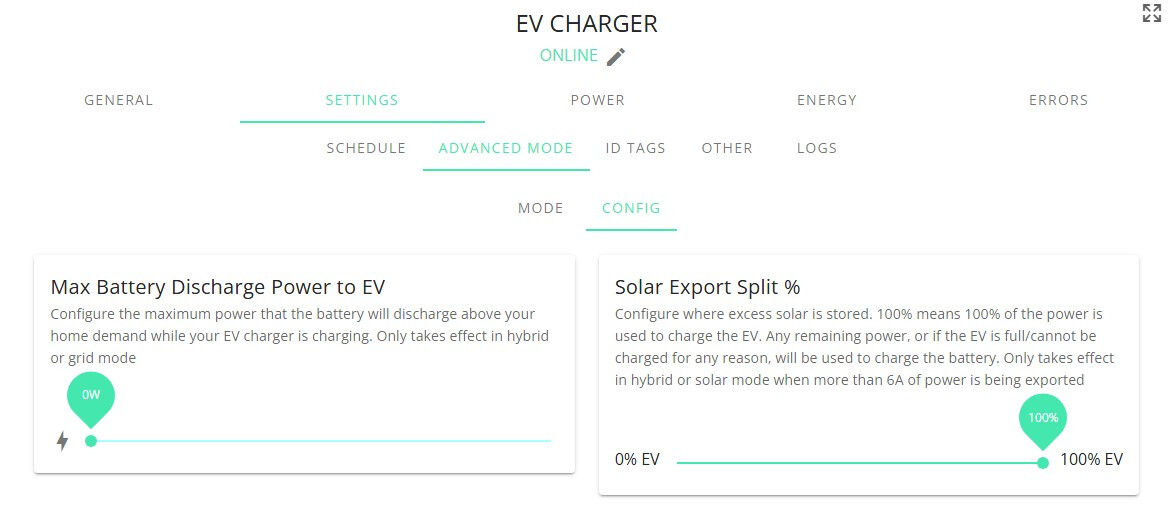
I’m yet to get an EV but the Mrs’ Evoque will more than likely be replaced with a Tesla, I’ve bought a Givenergy EV charger that is yet to be fitted properly but as it was used I’ve wired it in just to boot up and make sure I can get it on the network etc. I’ve managed to get it online using GIV-OCPP on home assistant and it appears that it world work. The only setting that I’m unclear of / cannot see is for the house batteries. Apparenty on the standard app there is a toggle so that the charger will not touch power from the batteries, am I missing it?
Welcome Andrew. No that’s not correct. It depends on where you have taken the supply to the EV charger from and where the CT clamp is.
My GE EV charger was wired directly from the house consumer unit, and the Givenergy CT clamp was on the inlet to this CU, so it see’s the EV charging as house demand and discharges the batteries here.
There was no toggle I ever saw where the EV charger could tell the inverter not to divert the house battery to the car.
It could (although I have never tried it) charge the car with only excess solar energy instead of exporting it to the grid, but then the EV charger would just throttle the current going to the car to keep the export rate at 0.
I also now have an Indra Smart Pro charger, and I have moved the supply to both chargers to upstream of the CU, done by a qualified electrician with Henley blocks. Now the EV chargers do not show to the GE system as household demand and the GE battery does not discharge to the car.
I have not used my GE charger since getting the Indra, but that is because the 4g Octopus signal could not get to my Audi, so I now have the Indra doing the smart Igo charging.
This is the giv app screen I have seen which shows the battery control and also the solar control that you mentioned.
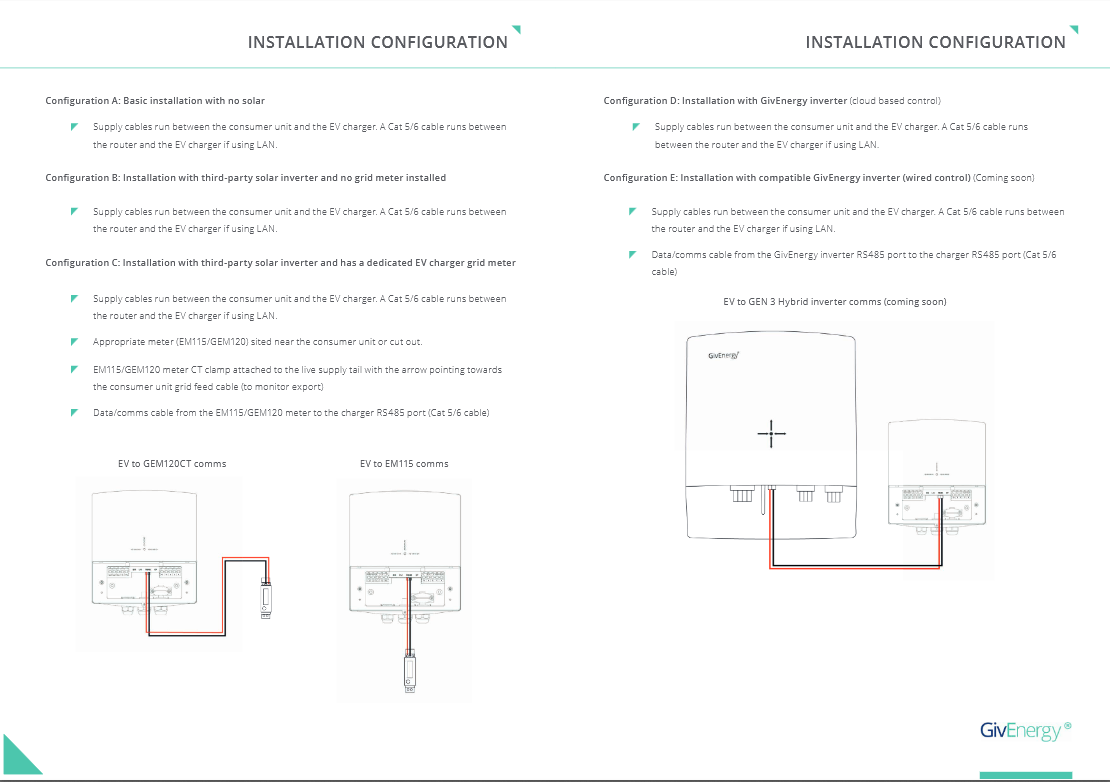
According to the installation manual the GIV-OCPP technically emulates configuration D which is my preferred method but E is also easily doable. Either will be direct from the grid henley blocks just before the consumer and the charger will have it’s own box with surge / MCB. Either of these methods are supposed to tie to the inverter.
I’ve got a feeling I’m going to have to connect it as givenergy intended and then try and use GivTCP, the more I think about it the more I’m starting to answer my own question…GIV-OCPP app on home assistant cannot see my inverter which may be the issue
 ) and it works great for me - I’m using Predbat to schedule charging so basically only needed an on/off switch but it does more for those who need it.