I will try tonight when I get home from work and let you know how it goes
Thanks Dave
1 Like
Unfortunately it was not successful
The light flashed fast for a moment but did not show in my network list at all
Then it flashes steadily and same result
On another note going back to LAN
One thing I have noticed during all of this
When the inverter dip switch is on 0111 the dongle light still flashes constantly obviously this is meant to be LAN mode according to the instructions
But when I put the dip switches as 1110 the dongle light no longer flashes
Either way it still doesn’t pick up any connection
1 Like
The reason it does not flash is there is no setting for 3 up 1 down or 3 down 1 up?
There are only these three settings.
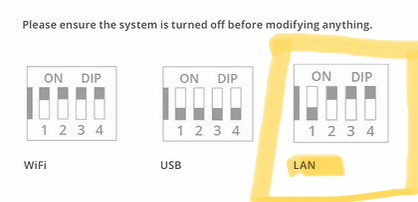
1 Like
It’s a shame you can not get the WiFi working, the video does say if you can not see the WiFi the dongle has not been reset, try again. You have tried a number of times and if you still can not get to the inverter AP then there is nothing more I can do, I am sorry.
If it does not work on Ethernet either then it is indicating there is an issue with the motherboard.
I would now call your Installer and get him round as a first step, he would be able to double check and then contact GE to arrange a replacement.
If he is unwilling or wants some £ to come round then the only other option is to contact GE.
Yeah I think I might just concede that it’s faulty and now have to put it in the hands of GivEnergy who have not responded to my email since I sent it 16 days ago
Thanks for all your help sir you’ve been brilliant and I’ve learnt a lot about the inverter over these past two weeks
1 Like
Hi Boston - wondering if you have this resolved as I have the exact same problem.
Hi Mark
No not yet, GIVENERGY have given me a ticket number but still no joy
One thing I did consider was trying to get the latest firmware on USB and then plugging that in so it forces a firmware refresh but the firmware download screen is down and I can’t get it anywhere else as I can’t do it via the cloud as it says inverter offline
1 Like
Key point from GivEnergy terms
• GivEnergy systems are expected to be connected to the internet and reporting to their cloud.
• If they are not connected sufficiently:
• Warranty can be reduced.
Specifically:
• If the system is offline for more than ~10% of its lifetime from installation,
→ the warranty may revert to a basic 12-month warranty instead of the standard longer coverage
What this means in practice
• There is no widely documented “shutdown” or lockout policy for being offline for months.
• The system will generally:
• Continue operating locally (charging/discharging still works).
• Lose cloud features (monitoring, remote control, updates).
• The main risk is warranty and support, not functionality.
Implications of being offline for months
• Firmware updates won’t be delivered automatically.
• Remote diagnostics/support may be limited.
• You could fall foul of the “10% offline” rule, depending on how long the system has been installed.
Lot’s of people suffering the same.
We were offline since last November when we changed internet provider and we tried all sorts.
It is a waste of time trying to get help from GivEnergy, they just do not respond as you no doubt have found out.
We had our system installed by Octopus and and who are our energy supplier.
I contacted their aftercare who got onto it quite quickly and sent an engineer out who was unsuccessful. He returned a week later and got it working including installing a plug in extender.
Since then it has been up and running OK, thanks to them.
I asked what can I do if or when we change our internet provider. The engineer said not to bother with GivEnergy and contact Octopus aftercare if this happens.
The one thing that I found out is that Octopus do not use GivEnergy anymore and that GivEnergy always seems to fall back on “Contact your installer”.
Good luck.
1 Like
Hi Boson2939,
Just checking it to learn if you’ve had any success getting back online?
I’ve been trying for weeks to get back online and reading through your posts I am having EXACTLY the same issue. The full switch off and restart reset results in the LED rapidly flashing for about 30 secs and then it settles into a steady flashing. No SSID is broadcast at anytime. I have a case number with Givenergy but I’ve received no response from their support desk. My batteries only charge via solar now and I can only get grid power when the batteries run down below 5% (I think). Therefore living in Scotland the batteries spend a lot of time very depleted and that worries me greatly.
1 Like
Hello Mark
No I still am down without access to the inverter. I’ve been passed from pillar to post between GivEnergy and OVO over who is responsible for fixing it
I’m confident that I’ve exhausted all avenues to diagnose and Ive found out that it’s quite common that if this happens it could be a communication module failure or AF21 I think it’s called , so my expectation is that someone replaces it really as it’s only 12 months old but neither party want to really grab the bull by the horns and provide any desire to get it sorted.
1 Like
Hi Boson2939,
Are you back online?
Thanks
Mark
Hi Mark
No still offline
No idea what’s going to happen now GivEnergy have gone into admin
I’ve stopped even trying to contact them now
Have you had any update ?
I am back online and thats why I reached out to you. Your symptoms were exactly the same as what I was faced with. Turns out the Gen 3 internal comms module was faulty. I have used a Wifi dongle which has allowed me to get back online. Have you tried this?
I did try it initially but I wasn’t sure how to set it up and I ended up trying to format it so I could change the serial number of it to match the inverters?
Anyhow I was left with a dongle which was also does not broadcast
Would you mind walking me through what you did as it may be something I’d try again as they’re about £50 or so? So its worth a go
Does the dongle have the MSN.text file using the same name as the inverter serial number. Mine started with WH. That should get the SSID broadcasting. I used a USB lead to set up the dongle to position it outside the inverter so it had a more stable WiFi connection. Make sure the DIP switches are in the USB position when you plug the dongle in.
No not anymore
I plugged it into my laptop and it said I needed to format it
As it wasn’t broadcasting I went ahead and did that but now it’s empty with nothing showing in windows explorer
It still flashes blue but won’t appear in any network list
Do you think it’s worth me buying a new one? Changing the msn file to my inverter and then it should work?
Have you checked to see if the internal Comms.module in the inverter has the inverter name in it. Connect the inverter to a laptop. No need to change DIPs and see if it’s there. If it isn’t type it in and see if the inverter starts broadcasting.