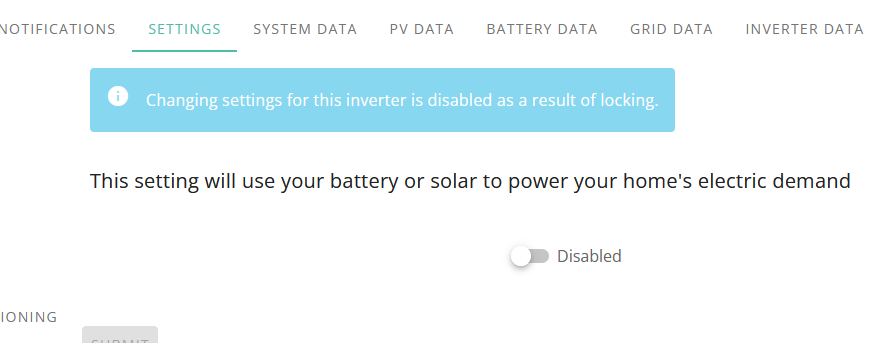
I have the following, and I am not happy at all… is there any way to reverse it? I checked the logs and I cannot see any locked messages. No idea why this happened.
I saw a message in another post that these are new API implementations, this is not something I have agreed to or expect, especially the part that states a lock may never expire unless it is set to expire, or removed by whoever locked it in the first place.
This is unacceptable, who thought this was a good idea? How can we re-gain access to our devices without involving anyone else or waiting for support?
I have been on WhatsApp with support for an hour, not helpful, asked if I have an API, I have 3 of them. Having an API lock your system out, and keeping it locked even after you delete the API, is not a feature anyone would want or ask for.
Honestly all I want is to know how do we reset it, can we stop it from happening, can we reset the battery to default settings and wipe the memory… without removing any of the API?
Just wanted to share my experience after spending over 2 hours with GivEnergy Customer Support on WhatsApp trying to understand why I’ve lost control of my system.
Every time I asked about the lock, they pointed me back to the Octopus API and the Smart tariff, yet nowhere in the terms and conditions is this lock explicitly disclosed.
After pushing for clear answers, here’s what was ultimately confirmed:
GivEnergy will not remove the API lock, even if the system owner directly requests it.
There is no user-accessible override, once a third party applies a control lock via API, you’re stuck unless they choose to release it.
This lock is not disclosed in any user-facing terms, API documentation, or tariff signup process.
The lock doesn’t just limit Octopus automation, it also blocks access for other platforms like Home Assistant, Node-RED, MQTT, and custom integrations.
As it stands, I, the owner of the system, have no control over a product I purchased.
The points that you have raised do look to be of great concern. Locking you out of your own system without your consent must surely challenge your consumer rights.
Are you sure that the agreements you have signed up to do not actually agree to this?
Not sure what tariff you are on, but this clause from Intelligent Octopus Flux terms for example does appear to give Octopus “exclusive” control of your equipment. Exclusive control could include locking you out.
Worth noting: Under Intelligent Flux, the battery typically charges to around 20% at 19:30, then sits idle. Around 2:00 AM, it charges up to 50%, sits again, then randomly tops up to somewhere between 50% and 70%. Finally, just before 16:00, it charges fully to 100%.
From a battery health perspective, this kind of inconsistent charging pattern, especially repeated full charges, is not ideal. So I started overriding it and manually charging to 100% at 2.5kW instead of 6kW, to reduce stress on the battery.
They also tend to fast-charge the battery during hot periods, with battery temperatures reaching 65c+, when really they shouldn’t be, again, not great for longevity.
To me, it’s clear that Intelligent Flux isn’t optimised for battery health or long-term ROI. It seems to be more about meeting Octopus’s grid obligations than protecting your hardware. And if you try to take back some control, they’re not happy about it.
It would be great if their algorithms factored battery lifespan, solar pv output, battery temperature and other battery health related variable into the equation.
The word “exclusive” is in there for a reason. It allows them to “exclude” all other parties (including you) from controlling the equipment. This allows them be in full control of responding to demand requirements (which could change at any time).
I am playing devils advocate a little with this. I generally agree with you about the morality of this, but the point I am making is that yes, Octopus do want to take full control of your system for their benefit, even at the expense of the well being of your hardware.
This is the price of handing control of your equipment over to other parties.
The locking works at the API level not local modbus level so you shouldnt have any issues locally (beyond them polling to check state and putting things back)
Locking should only be in force when on IOF or your in the middle of an Axle event (or equivalent service). Are you seeing this outside of those things?
To me, i see it more from their perspective in that you’ve handed over control in return for better rates. I can think of no possible reason, given the rates & the losses involved in charge & discharge, that i would want to let it do anything but its own thing.
The battery will be fine no matter how its charged, its designed to be charged at all sorts of rates from PV after all. The EMS devices would also do similar rate fiddling and thats an OEM device.
Having to constantly check an entire fleet of inverters is doing as instructed must be a massive resource hog at both Octopus & Givenergy level - locking solves this by somewhat guaranteeing that the system is as per last instruction sent (except for the most determined meddlers) and that they can meet whatever grid obligation they are trying to fulfill.
I will concede that there should be away to disconnect service from Givenergy side (even if that auto boots you off the tariff)
We have a relatively new system and joined OIF last Sunday. Since then the battery has not charged past 50% and export schedules have not optimised the 4-7 period. We tried to change the export schedules and got inverter locked. Tried to set eco mode and again locked message.
We’ve been talking to Octopus support since Wednesday to ask them why they are constraining the battery and they seem clueless. Keep telling us to set the charge to 100% even though we can’t. Yesterday after much to and fro we had an email confirming that there was a new API that locks the inverter. Today we got another email telling us to change our settings to 100%. Which obviously we can’t do cos they’ve locked it.
We’re considering moving back to Octopus Flux so we can have control of the inverter back but are concerned that Octopus will not release the Lock and we’ll be stuck on a worse tariff and still unable to manage our schedules.
We’ve spoken to Givenergy and they told us to ask Octopus to remove their API which hasn’t been done. We feel stuck - any suggestions from the community on what to do next?
There is an option to disconnect the inverter from octopus in the octopus app
One would hope that it would remove the lock at that point!
And of course once you’ve done that, find another tariff! Cuz if you don’t want octopus to control your device you shouldn’t expect to stay on the IOF tariff.
I’m happy with IOF, on the most part, as is by far the best octopus tariff for me during Spring and Summer.
It does do some weird things sometimes (like exporting during off peak - which it can of course do it it wants to!) and it sometimes has tech wobbles (no charging or exports at all during one particular bank holiday weekend) but it’s mostly pretty good.
Flux might be the compromise where people want control. You can then use other automation to make that a bit smarter such as wonderwatt or PredBat.
Thanks for the reply we disconnected the battery on the my devices page of the Octopus app (as support suggested that) and the lock remained. That’s when we started getting worried!
I think we’d be ok with relinquishing control if Octopus could explain why they are only charging the battery to 50% but they keep avoiding that question. Just feel like we’ve paid for capacity that is sitting idle.
We’ve still got the support call open so will update if we get any help.
@drrajmistry
Your experience mirrors exactly why I am not very happy with Octopus. The inverter lock, erratic charging, and vague support responses are all part of what I went through.
Like you, I noticed:
The State of Charge (SOC) capped at 20–50%, without any transparency or explanation.
Discharging during off-peak hours, followed by forced imports at peak rates, completely defeating the purpose of optimisation.
Export schedules not matching the 4–7pm peak, even when clearly beneficial.
Unable to charge to 100%”, due to system being locked.
For anyone on IOF, I’d strongly recommend:
Monitoring your SOC and charge schedules closely.
Asking Octopus to remove the API link before switching tariffs.
Hope this helps, and sorry you’re going through this, it’s frustrating.
Thanks for the update. I think the tug-of-war you spoke of is exactly what Octopus were trying to avoid by applying the lock. I can envisage a Home Assistant automation that looks for Octopus making a setting change and immediately changing it back when it detects one.
The grid needs balancing both in both directions, so all this is really doing is interfering with the flex market (im not everyones mum but dont be too shocked if Octopus start enforcing things a bit more like they did with IOG when people were rigging huge cheap windows)
I’ve been on this tariff since it first came out & you’ll see it change tactics into winter and pay more attention to the weather (hence why it’ll look like its being a bit thick in summer, but its not)
Octopus in summer will leave you short of the final “charge” near 4pm and then appear to panic and quickly catch up BUT because the way large power plants ramp alongside decaying solar output, it does actually make sense - they can quickly flex to absorb any excess of both sources as the grid spools up to supply a 10GW+ surge in demand at 5pm. (They would probably want this charge portion in summer between 4-5pm but then it messes with the peak rate window)
Youll see in summer it’ll hold back the discharge part until later. In Winter it normally always starts at 4pm.
As for the battery being abused. Each to their own but the AIO has that many cells in it that it actually runs a pretty reasonable C rate of around 0.4C even at full bore.
The charge to 50% thing - have you looked through the log history in the portal - you can check a box for failed commands - have they tried to charge to 100% and its just not made it to the inverter (I dont think their retry loop is much good from memory). I cant remember mine ever not being full for 4pm but equally this whole scheme is regional so my area may need every kWh it can get, yours might be flush with devices so less demand for it.
I have seen maybe 2-3 occasions where the battery fails to charge before 4pm, leaving it empty for peak rate. Rare but had happened. Usually something has gone wrong between octopus and giv.
If I want to cook at say 5/6pm, I’d be using peak rate power. Or having salad.
It does make me a little anxious when it doesn’t charge up until the last minute, but maybe I should trust it a bit more.
If it’s under 30% by 1.45pm I get a notification from home assistant.
If need be, I’ll set a very low timed charge. I don’t force it, so if octopus decides to stop or ramp up, it’ll let it.
The slow charge wouldn’t get to anywhere near 100%, but it gives me a little confidence that there will be something in the battery to use for cooking and export too, plus leaves room for octopus to import later at a high rate if it needs to.
I dabbled with intelligent octopus flux and didnt like it either. Relinquishing complete control of your Solar PV infrastructure to the utility company on a beta product isnt a particularly good fit for prosumers who like to dabble..
I ended up leaving and going to a dumb E.ON tarriff as the pricing was much more transparrent.
Hi, @DREI thanks for the information.
We had an update from Octopus yesterday - they said the API team had found a bug and asked us to disconnect the battery from the app and then re-connect it, and that should stop the inconsistent charging behaviour.
Did that and today the battery did not charge at all, and has been stuck at 3% SOC all day.PV has been exporting to the grid all day.
So … installed Home Assistant + GivTCP + Mosquitto as you suggested and now have some control back. Battery is now charging from the Grid, I’ll keep an eye on behaviour tomorrow & hopefully will be able to get some sensible behaviour out of it.
Just need to get my head around Home Assistant, setting up dashboards and automations ….
Since everyone seems perfectly happy to hand over their rights without question, I’ve decided to join in, it’s so much easier when you stop thinking for yourself. Who needs choice, transparency, or accountability when compliance is so much more convenient?
Ok last night we forced a battery charge and it got to 50% and then stopped. In the mobile app I can see there is a “Timed Charge” Limit set to 50%, unfortunately I can’t change it as my inverter is locked.
In Home Assistant I can’t see this parameter so I can’t change it.
This morning I’m seeing the battery being charged from the PV array, but I guess this will stop at 50% as well.
I’m trying to get hold of GivEnergy support via WhatsApp but they’re busy can the automated message says “Try again later”, Ideally I’d like them to increase this upper limit (or let me know how I can do this via HA).
I’d also like to set the “Timed Export” limit to 15%, currently this is 4% (The same as the default battery cut-off), and this is way too low in my opinion.
I’m not sure about disconnecting the inverter from the cloud (yet), there are some fundamental settings I’d like to change, and I’m unsure of the legality of doing this.
Longer term, I’m with you @DREI , I’ll probably run HA on a dedicated computer 24/7, currently it’s in a VirtualBox VM on my laptop.
I’m pretty sure I’ve got enough defunct computer parts lying around to do this.
I’ll have a go at creating the pretty graphs & controls on the dashboard next.
I believe that it is a condition of your remaining warranty and ongoing support that your inverters have continuous internet access.
The 50% charge limit will be within one of your charge slots or possibly a global charge limit. Keep browsing through your available entities.
Be careful about using export down to x%. Once it reaches x%, your exporting will end and your house load will be taken from grid. You need to actually end the export session and revert to Eco mode if you want house load to be taken from battery.
If you go onto the givenergy cloud portal can you view the remote control page? If so you should be able to see which control is set to 50%.
In HA check the following entities :-
‘Enable Charge Target’, unless you want to set a target this should be off.
‘Target SOC’ make sure it is 100%.
‘Change Target SOC 1 - 10’, one for each charge slot, check all are 100%.
Even after doing this Octopus may just overwrite what you have done.
If I am going to set up a charge or discharge I never use slot 1 as this is normally overwritten if something makes a change to the system. So by having my charge and discharge times in slots 2 and above they are never overwritten and always work.